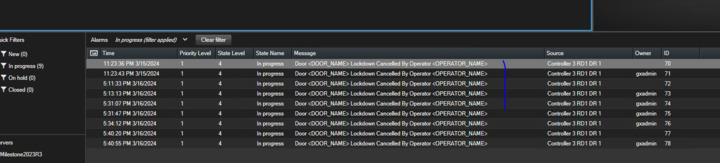
When triggering an event in our access control system, we set both a message and a reason. However, the Alarm list displays 'Event Type' in the Message column instead of our custom message. Is there a specific procedure we should be following for this?

When triggering an event in our access control system, we set both a message and a reason. However, the Alarm list displays ‘Event Type Name’ in the Message column instead of our custom message. Is there a specific procedure we should be following for this?

new ACEvent(

           [e.Id](https://e.id/ "https://e.id/"),

           definitionId, // This is shown "Door <DOORNAME> Lockdown..." of definitionId

           sourceId,

           e.Time,

          "test message.", // This isn't shown

          "test message..", // This isn't shown

           relatedCredentialHolderIds,

           null,

           null

           );
Hello Binh, we are looking into this and will let you know as soon as we have an answer.

Hello,

With the current implementation there is no direct connection between the Message field in ACEvent and the Message field shown in the Alarms table in Smart client.

The Message field in the Smart client is taken from “Alarm.EventHeader.Message” (which corresponds to the event name) and thus the Message field sent from ACEvent class is not used. This means currently there is no way to customize these messages from this part of the API.