When using playback mode with VideoViewer, there are PCs that cpu increases and stops moving.

I am sorry in my poor English.

Using VideoViewer in ComponentSamples of MIP SDK,

If you select playback mode with the operation below, the CPU will increase and the playback operation will be impossible.

1. Start Video Viewer.exe.

2. Enter your account and login.

3. Select an arbitrary camera.

· Live is displayed.

4. Click the “Current mode: Live” button.

· While playback mode is set, images are not displayed.

CPU is increased.

[Xprotect version]

Milestone Xprotect Professional 2016 R2 10.1a (1025)

[Operating environment]

* PC1

Maker: Hewlette-Packard Companey

Type: s 5 - 1270 jp

OS: Windows 7 Professional SP 1 (64 bit)

CPU: i7-3770 CPU @ 3.40 GHz 3.40 GHz

Memory: 8.0 GB

* PC 2

Maker: ASUS

Type: X555L

OS: Windows 10 Home (64 bit)

CPU: i7 - 4510 U @ 2.00 GHz 2.60 GHz

Memory: 8.0 GB

[Remarks]

An event occurs in both the local environment and the network environment of the Recording Server.

An event occurs for both camera codec MJPEG, H.264.

Live will be displayed without problems.

Even if you disable security software an event will occur.

We verify six PCs, only PC1 and PC2 above will be generated.

We do not verify whether the same type as PC1, PC2 always occurs.
Add information.

It worked normally until October.

Does the Smart Client work?

thank you your response.

yes, smart client work right.

I wonder if it is hardware acceleration not working. Try the VideoViewerQuality sample instead, Do you see the same issue?

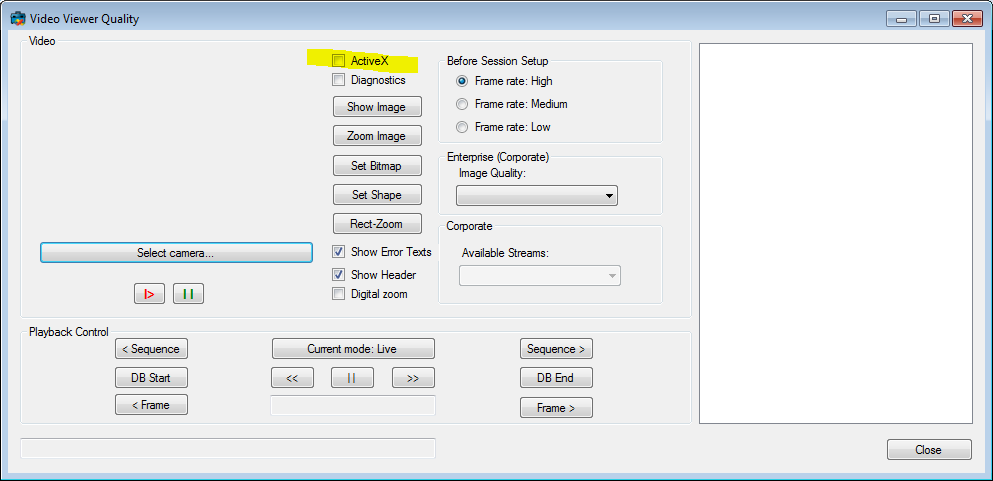
Now try to set the activeX option, this will revert to the use of the older activeX (no hardware acceleration), do you still see the issue?

What version is the MIP SDK? (Is it MIP SDK 2016 R3 10.2?)

OK.

tomorrow, I will try to it .

(owner of these pc was went back home… )

sorry.

one, I forgot of tell you to discript.

I developping for 32bit application with 32bit sdk.

that issue found from this application.

In order to investigate the cause I tried the 64bit VideoViewer I referred, But the same issue seen.

therefore, I used 2 version sdk.

32bit SDK:Milestone MIP SDK 2016 R2 - Redistibutable (x86) (10.0.1)

64bit SDK:MIP SDK 2016 R2 Version 10.1.vNext Build 169

If there was a wrong mix of dependent dll files I would expect neither live nor playback mode to work.

See (https://force.milestonesys.com/support/articles/en_US/Troubleshootings/Class-not-registered)

good morning.

Yes, i know 32/64bit.

I use each application and sdk .

I tryed to “videoViewerQuality”.

On result, PC1 is OK, but PC2 is NG.

if Frame rate set High, CPU increase and playback no work.

if Frame rate set Low, Cpu no increase but playback no work.

playback connect ok but no image.

video device is it.

PC1 Intel(R) HD Graphics 4000

PC2 Intel (R) HD Graphics Family

What I was most interested in is whether using “activeX” makes a difference. Does it?

-See if there are update of the graphics drivers available, it often helps..

sorry, I want to know detail name of “activeX”. What I was most interested in is whether using “activeX” makes a difference. Does it?

This is the sample we are discussing..

It is not my used “VideoViewerQuality”.

“ActiveX” dont disply._img_ alt=“It is not my used “VideoViewerQuality”. “ActiveX” dont disply.” src=“https://c.eu9.content.force.com/servlet/rtaImage?eid=9070O000000XaXk&feoid=Body&refid=0EM0O000000Xtci” _/_img_

I assumed you had the newest MIP SDK. If you have an old version you are not using hardware acceleration, it does not exist in old versions. Loook ing back on the thread I should have noticed..

I recommend using the newest MIP SDK. However I think we are looking at something else..

What happened in October? Did you introduce a new firewall or similar?

If you run the client in the server itself do you see the same issue?

I will try to newest MIP SDK.

Where is newest MIP SDK 32bit ?

>What happened in October? Did you introduce a new firewall or similar?

I do not remember. sorry..

>If you run the client in the server itself do you see the same issue?

yes. cpu increased.

I suppose increased CPU is expected but you would expect to see video..

Whenever there is a new MIP SDK there is a new “32-bit redistributable”

I realize you get that through the partner pages, I hope you are a Milestone Solution Partner, if you are you get it here: (https://www.milestonesys.com/my-milestone/msp/mip-sdk/)

If you are not a partner (Note this link will link to an old version once next version is out!) (http://www.milestonesys.com/download/MIPSDK/MIPSDK_Redist_Installer_2016R3x86.msi)

Perhaps you (if you are not a partner) sign up here. (https://www.milestonesys.com/partners/milestone-solution-partner/)

Thank you.

I tryed newest MIP SDK 32bit.

Replaced the old DLL in the application with a new DLL.

I tried ActiveX ON / OFF as advised.

すると、

ActiveX - ON: I see the same issue. cpu increased.

ActiveX - OFF: cpu not increased !!

What reason ?

what this pc differ?

Does it work when connecting Xprotect professional R2 and application created with MIP SDK 32 2016 R3?

Is your issue that CPU increases? Not that there is no video?

With ActiveX in off you use the new hardware acceleration capable component, this is what I recommend you to use. If there is no issues with that one I think we should consider it solved.

For the last question.

See (https://force.milestonesys.com/support/articles/en_US/FAQ/About-MIP-SDK-compatibility-with-XProtect-product-versions)

My issue is both CPU increase and no video.

And I understand to work when connecting Xprotect professional R2 and application created with MIP SDK 32 2016 R3.

Thank you very much.

Please let me ask you only one more question.

When I use to MIP SDK 32 2016 R3, “EnableVisibleLiveIndicator” is invalid.

So, it show message “connect to camera CAMERANAME” when the viewer show.

Can you this message hide?

Correct, In MIP SDK 32 2016 R3, “EnableVisibleLiveIndicator” on ImageViewerControl is not working, I believe it is deprecated.

When the ImageViewerControl starts it shows “connect to camera CAMERANAME”, this is by design, and you cannot change it by doing a different setting. You see the same behavior in the Smart Client.

Thinking of ways.. You could implement something where you hide the control until you see the first live status.