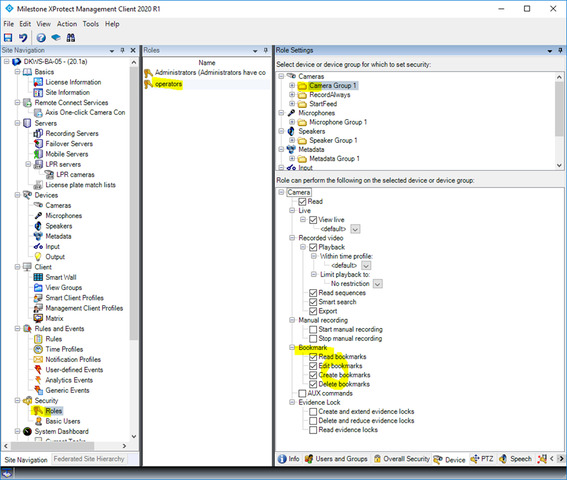
I’ve written a web service to create bookmarks using a service account created by my IT team. I have used this account to create bookmarks in the XProtect Smart Client, as well as during some exploratory coding done with the component integration libraries. Now that I’m using the protocol integration I am getting that error when calling the BookmarkCreate() method.
Not sure if the code sample is really needed, but I figured I’d at least include it just in case.
**EDIT**
I have been working with my company’s IT team to try and figure out if there is a set of permissions that we are overlooking in order to allow the creation of bookmarks via protocol integration to no avail. If such a set of permissions exist, details on how to make it work are appreciated.
Yes, my first “proof of concept” used the MIP SDK/component integration and I was able to create bookmarks no problem. Moving ahead, I could no longer use the component integration due to the dependency on forms.
It is an AD (Windows) user role that I am using, and have been told that there isn’t an “administrators’ role” but that each user has a sort of a la carte way of assigning permissions. If that last part is not true, then I need help explaining it to my IT team so we can sort this thing out.
You will get this error if the user does not have the necessary permissions. Using a user that belongs to the Administrators role is the simplest solution. You can also make a new role. Is this what you are trying? Does this work when using a user in the Administrator’s role? If you have created a new role have you in the Roles setup, in the Device tab, on the cameras set the bookmarks permissions?
Please note that you can modify the BookmarkCreator (component sample) so that it does not use the DialogLoginForm, you can find how to do this if you look at the Camera Stream Resolution sample.
We have tried making the role an admin and it still does not work in this application. Once again, the account in question was creating bookmarks in code that I wrote which was largely based on the UI version of the BookmarkCreator examples in the Component Integration code samples. I watched an IT person move the user account I’m using for my web service into an Administrator’s role and I still get the same error. All of the bookmark permissions are checked. Again, this account can make bookmarks, so the issue must be in connecting via the ServerCommandServiceClient.
We have not used a basic user. Previously, the account was in a role specific to a set of cameras that had full rights for bookmarks for that camera group. We moved that account into an Administrators’ role and I still get the same error.
The component sample works. It creates the 2 bookmarks, modifies them, and deletes them - I’ve mentioned that previously. The problem is that using the component sdk has dependencies that my webapi cannot provide (mainly the forms dependency) so using the component samples is unacceptable. I started working from there and had to scrap it.
Once again, for absolute clarity - The account has adequate permissions to perform the actions *and has successfully done so using component samples* the issue is ONLY when attempting to perform those SAME actions via ServerCommandServiceClient.
This is a very big mystery because we have never seen this before. We have talked to Milestone Development about this issue, but we have no idea why this happened. Can you please tell us which version of XProtect and SDK you use?
I tested XPCO 2019 R2 and SDK 2020 R1. Protocol Bookmark sample worked with AD user and basic user.
Does your user have multiple Roles in Management Client? If so, please use one Role and please test it again.
This question may sound a bit silly, but can you please check if there is a typo in your user account and password?
If there is no typo, can you please share your user permission details that you are setting?
Please note that you can use the Component sample and just remove the login dialog form. Login without using the form is shown in the sample CameraStreamResolution.
For full transparency, I was using SDK version 2019 R3(?) - likely the last release before 2020 R1.
The account was set to multiple roles, however modifying this didn’t help. We also tried creating a basic auth user with administrator privileges and that gave the same error as well.
Once again, I am using Protocol integration, not Component integration. Following the CameraStreamResolution sample does not help me. This is how I am setting my connections, hopefully it will clear some things up:
public static void MakeConnection()
        {
            string username = "user";
            string password = "pass";
            string uri = "http://milestonemgt.<companyURL>:80/ManagementServer/ServerCommandService.svc";

            try
            {
                var binding = new WSHttpBinding("WSHttpBinding_IServerCommandService")
                {
                    MaxReceivedMessageSize = 10000000
                };

                EndpointAddress remoteAddress = new EndpointAddress(uri);

                Client = new ServerCommandServiceClient(binding, remoteAddress);

                Client.ClientCredentials.Windows.ClientCredential.UserName = username;
                 Client.ClientCredentials.Windows.ClientCredential.Password = password;
            }
            catch (Exception ex)
            {
                Console.WriteLine(ex);
            }
        }

        public static LoginInfo Login()
        {
            loginInfo = Client.Login(_guid, Token);
            Token = loginInfo.Token;
            ConfigInfo = Client.GetConfiguration(Token);

            double ms = ConvertMicrosecondsToMilliseconds(loginInfo.TimeToLive.MicroSeconds);
            ms = ms > 60000 ? ms - 30000 : ms;

            _tokenExpireTimer = new Timer(TokenExpireTimer_Callback, null, (int)ms, Timeout.Infinite);

            return loginInfo;
        }
I removed the certificate long before in an attempt to solve this same issue. (For the sake of argument I re-added the X509 stuff and it still didn’t work) No matter what I do to the connection, nothing works. The only thing that has remained constant is the method in which the error is produced.
The ‘unmodified’ protocol bookmark sample appears to work (although I did have to increase the MaxReceivedMessageSize) although I cannot find the bookmarks in XProtect Client (I commented out the delete portion of the unmodified protocol sample so see if I could still find the bookmarks)