We disabled the firewall on the Milestone server side, and also added the port number 22331 to the firewall on both the client and server side.
Please troubleshoot with this article -
https://developer.milestonesys.com/s/article/Ports-for-alarms-from-Milestone-Event-Server-service
We have opened the necessary ports according to the above article’s instructions to both the client and VMS side. We even tried to disable the firewall on the VMS side. The below attached snapshot shows the exception thrown by the MIPSDK AlarmViewer sample app. Can this exception be thrown for reasons other than the port?
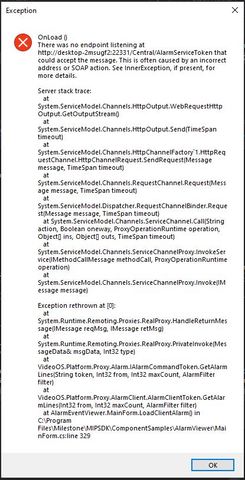
That exception should only happen if nothing is listening at that port. Is the Event Server running on this machine?
Also, please try the following in your browser (where you run the client) and check whether it provides a result: http://:22331/Central/AlarmServiceToken
Hi Peter, thanks for your support.
Yes we confirmed the Event Server is running. Please take a look at the response we received from the browser as requested. Since the above call generated a response why does the sample app still generate that exception?

I can see that the exception contains a DNS name whereas you have used an IP-address in the browser. My guess is that something is going wrong with the DNS lookup.
The exception shows the host name but we provide the server IP address to the login dialog as the attached snapshot shows.

What happens if you provide the resolved DNS name from the exception (desktop-2msugf I think) in the URI in the browser?
It seems like somehow the IP address is resolved incorrectly internally in the VideoOS.Platform - could it be there is some problem with your DNS? What do you get if you do a nslookup on that hostname in a command prompt?
If we try “http://desktop-2msugf2:22331/Central/AlarmServiceToken” the browser replies with “Can’t reach this page”.
For the “nslookup” we get the following response:
[C:\WINDOWS\system32](file:C:/WINDOWS/system32)>nslookup
Default Server: dns.google
Address: 8.8.8.8
We are able to receive events from the Event Server. If there was a problem with our DNS would we be able to receive events from XProtect Event Server?
Regarding nslookup I meant running the command “nslookup desktop-2msugf2” to see what that address resolves to. I would guess that it either cannot be found or points to some other IP address.
Similarly you can also try to run “nslookup 192.168.140.162” to see if it indeed resolves to the correct hostname.
Unfortunately different parts of the VMS and the platform resolves addresses in slightly different ways and thus it might work in some places while not in others if DNS setup is not correct.
Both commands
nslookup 192.168.140.162 &
nslookup desktop-2msugf2
claim that it cannot be found.
If we can always receive events from the Event Server then why wouldn’t “alarmClient.GetAlarmLines” and " alarmClient.UpdateAlarm" work given they also communicate with the Event Server?
As already mentioned the SDK some places uses different methods for resolving/connnecting to the server, so that is why you get events through, but the alarm request is failing.
The hostname is received from the server, so either somethign is wrong in its configuration or it has two different network adapters and only one of them (the one not used for the integration to connect) is on a network that know the hostname.
Another possibility could be that the address registered in the VMS registered services include the hostname. Could you please check in Management Client under Tools and Registered services whether the event server is listed with the hostname in the URI there? If so you can also try edit it in there to instead use the IP address.
Thanks for your support. Modifying the URL in the registered services resolved my issue.