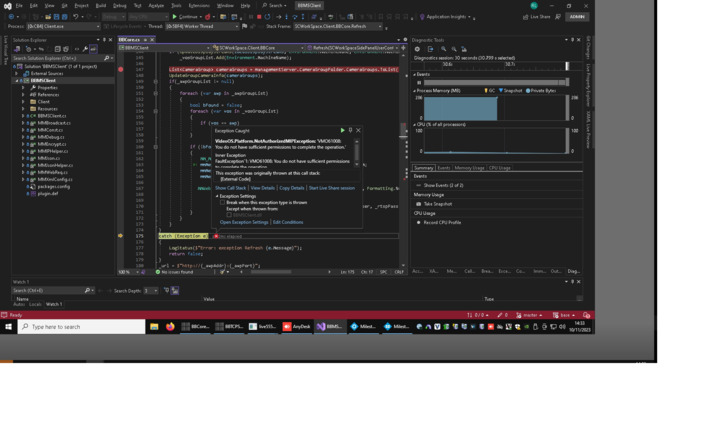
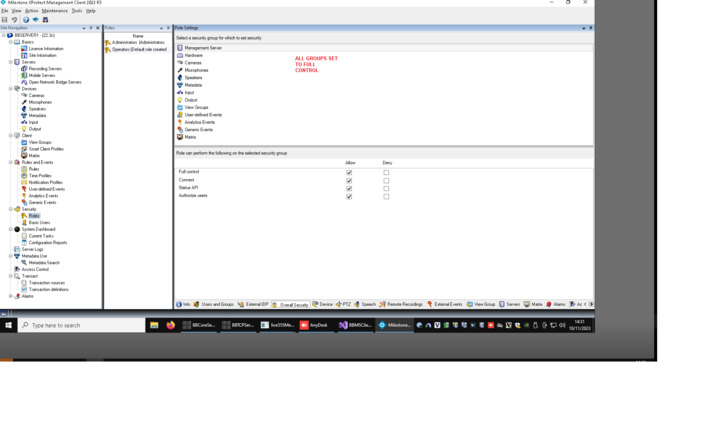
Hi, why is MIP SDK access to the VideoOS.Platform.ConfigurationItems.ManagementServer
object mandated to Admin access only?
As a MIP Plugin and logged into the xProtect Client, server 2022 R3 as an Operator, even with all Groups set to Full Control (see images) when we expand the SDK structure:
managementServer.CameraGroupFolder.CameraGroups.ToList();
We get an Autherization Exception (see images).
What am I missing ?
If we log in as an Admin role to xProtetect client then the SDK call is OK??
Based on your question here we have come to the realization that this is an issue in all versions. The issue can be seen in all the product versions except in XProtect Corporate. XProtect Corporate has a feature named tiered admin rights whereas XProtect Expert, Professional+, Express+, and Essential+ doesn’t. When doing the background check it is relying on on the functionality of this feature. This means that for Corporate you can set the right for the management server object and make it work, for the other product version you have to be a member of the administrators role in order to be able to read ManagementServer.CameraGroupFolder.CameraGroups.
There is a workaround. Instead of using the ConfigurationItems class you can use the MIP configuration, the VideoOS.Platform.Configuration class, instead. If you explore the Config Access via SDK sample you can see how this works.
https://doc.developer.milestonesys.com/html/index.html?base=samples/componentsamples/configaccessviasdk/readme.html&tree=tree_2.html
Hi,
I’m just a simple software engineer of 30 years  are we suggesting we replace with:
VideoOS.Platform.Configuration object?
Does it require:
VideoOS.Platform.SDK.Environment.Login(…
Etc?
The code has started to become complex similar to the samples.
We only need the Camera names, GUIDs and Groups from the already logged in user/client?
Thanks!
I am sorry that you feel the sample is complex, but I guess you have a point, in that what you ask and need is so small compared to the sample. I have made a small sample..
private void GetCameraGroupsMIP()
{
	var cameras = Configuration.Instance.GetItemsByKind(Kind.Camera);
	RecursivePrintCamera(cameras);
}

private void RecursivePrintCamera(List<Item> items)
{
	foreach (var item in items)
	{
		label1.Text += item.FQID.FolderType != FolderType.No ? "Folder " : "Camera ";
		label1.Text += item.Name + Environment.NewLine;
		if(item.HasChildren != VideoOS.Platform.HasChildren.No)
		{
			RecursivePrintCamera(item.GetChildren());
		}
	}
}
Just like it was the case with your previous code you need to be logged in. If you are developing a plugin that comes automatic.
PS. Maybe I should have pointed to a plugin sample instead. The ConfigDump sample is pretty much the same as ConfigAccessViaSDK. Maybe with my few lines of code you have what you need, otherwise try the ConfigDump sample.
Thanks Bo, appriciated. Got it working as expected with the following code based on yours above:
private void RecursiveLoadCameraGroupFolder(List items,
       List<MSCameraGroup> mSCameraGroups, MSCameraGroup folder, string addr)

   {

       // Kind.Server Kind.Folders Kind.Camera

       foreach (var item in items)

       {

           if (item.FQID.Kind == Kind.Server)

               addr = [item.Name](https://item.Name);

           if (item.FQID.FolderType != [FolderType.No](https://FolderType.No)) // folder

           {

               if (item.HasChildren != [VideoOS.Platform.HasChildren.No](https://VideoOS.Platform.HasChildren.No))

               {

                   MSCameraGroup folderNew = new MSCameraGroup();

                   folderNew.msLabel = [item.Name](https://item.Name);

                   folderNew.msID = item.FQID.ObjectId.ToString();

                   mSCameraGroups.Add(folderNew);

                   RecursiveLoadCameraGroupFolder(item.GetChildren(), mSCameraGroups, folderNew, addr);

               }

           }

           else // camera

           {

               MSCamera msCamera = new MSCamera();

               msCamera.msAddr = string.IsNullOrEmpty(\_rtspAddr) ? addr : \_rtspAddr;

               msCamera.msPort = \_rtspPort;

               msCamera.msID = item.FQID.ObjectId.ToString();

               msCamera.msLabel = [item.Name](https://item.Name);

               folder.msCameraList.Add(msCamera);

               Debug.WriteLine(folder.msLabel + " : " + [item.Name](https://item.Name));

           }

       }

   }
Thanks.
Thank you for the feedback, and thank you for sharing your solution!