I am a C++ developer. I am developing my App using 2018R1 win32 SDK ( C++ ). I want to get the playback video between BeginTime and EndTime. I realize this function using this logic( pseudo-code
as follow):
	bool firstMoveflag=false;
	bool m_isFirstMoveToSuccess=false;
	while( BeginTime < EndTime )
	{
		if ( firstMoveflag == false )
		{
			m_isFirstMoveToSuccess = (m_pPlaybackSourceToolkit->MoveTo(BeginTime,searchCriteria)== ImPlaybackSourceToolkit::MOVED_OK)
			firstMoveflag = true;
		}
		if (m_isFirstMoveToSuccess)
		{
			if (MoveNext())
			{
				if (m_pPlaybackSourceToolkit!=NULL)
				{
					if (m_pPlaybackSourceToolkit->GetData(recordData) == ImPlaybackSourceToolkit::DATA_RETRIEVED)
					{
						const ImUTCTimeProperty *p = dynamic_cast<const ImUTCTimeProperty*>(recordData->GetProperty(MileStoneCommonDef::PropertyNextBeginTime));
						if (nullptr != p)
						{
							BeginTime = p->GetValue();
						}
					}
				}
			}
		}
	}
maybe the pseudo-code is not very clear so I give a simple summary:
	while(beginTime < endTime)
	{
		// 0
		if( firstMoveTo )//only first time
		{
			moveTo -> beginTime
		}
		// 1
		m_pPlaybackSourceToolkit->GetData(recordData)
		// 2
		ImUTCTimeProperty *p = recordData->GetProperty(PropertyNextBeginTime)
		// 3
		beginTime = p->GetValue()
		// 4
		m_pPlaybackSourceToolkit->MoveNext()

	}
the problem is that . When I do like UP Method . I can get the playback video,all work well . but when I get 10 routes or more from the Recorder Server of milestone VMS , the playback video play slower abviously. Why ? What is the problem ? Do I make something wrong? Is there any better method to realize the function ?
I am waiting for your reply. Thank you.
Sounds like you are requesting same GOP several times.
Please consider that when receiving LIVE video, you get one frame at a time, while when doing PLAYBACK you get a list of frames (= one GOP).
A GOP can be 1M bytes in size, so over routers it will be delayed, depending on the routers queue capasity - and may lead to retransmission, and they is slow.
Use WireShark trace to see if retransmission occur.
Another problem , I met a exception :
because there is no PDB file, I do not know which code cause the exception. what is the reason of problem, what I can do for it? thank you.
When you work with toolkit you must stay in the same thread. (maybe relevant)
Can you please share the information in the exception?
I had pasted the exception message on above,but there is nothing now. … .
.
the exception is :
An unhandled exception at 0x0558F015 (CoreToolkits.dll) (test.exe) : 0xC0000005: access conflict occurs when the read position 0xEDEBA338 is read.
I did use the toolkit in different threads. One thread use the toolkit to get data, another thread can disconnect the toolkit(just like : m_pSourceToolkit->Disconnect()) when the get-data thread exits. is there something wrong?
And this exception does not aways occur, but aways occurs when my app run a long time,just like a ghost😂
Must be same thread, yes. Be careful using the factory and all to open and close the objecs in the right order.
I think the exception could be explained on not using one thread.
I meet a another strange problem. In my test environment , everything works well.
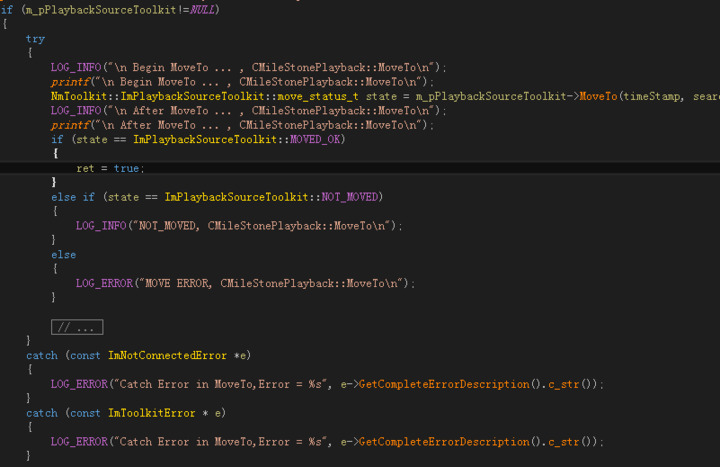
But at The User’s site, my app can not get the playback stream. I add some logs,and find that there is something wrong with the MoveTo() function. the problem is that the log file can find the " Begin MoveTo … " but there is not "After MoveTo … " and there is nothing error or exception,just like the program stop at the MoveTo() function . How strange it is !!! Is the MoveTo() function busy looking up video?
LOG_INFO("\n Begin MoveTo ... , CMileStonePlayback::MoveTo\n");
NmToolkit::ImPlaybackSourceToolkit::move_status_t state = m_pPlaybackSourceToolkit->MoveTo(timeStamp, searchCriteria);
LOG_INFO("\n After MoveTo ... , CMileStonePlayback::MoveTo\n");
The picture above is more complete logic
Does it make a difference if there at the time you goto is recorded footage in the camera or not?
Can you break and show the stack trace information?
I can’t get the stack trace information bacause our user’s site is so for and there is no debug environment there. I write a another sample demo ,I don’t know whether It would work well .Maybe I won’t get the result until next Monday.
Is it possible that this function( MoveTo() ) has been querying the video, so it has not returned?
Or milestone VMS set some permissions to prohibit queries?
The MoveTo should never freeze this way. We were speculating if you exception handling is complete, if you add a general catch might there be an exception?
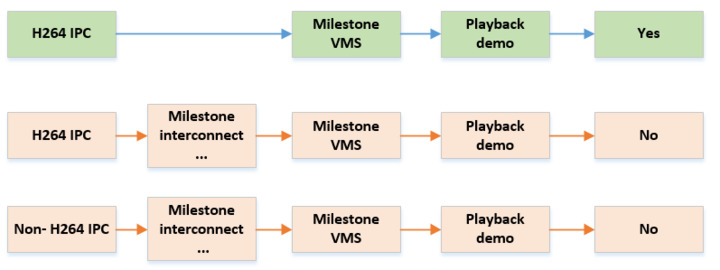
I am sorry for replying you so late due to my colleagues at the scene have been very busy! Using my playback demo, the situation is that now when we set the stream’s Codec to H264, the demo can get the playback video. but the IPC which did not support h264 can not get the playback video. And We find that the IPCs which do not support h264 are connected to the milestone VMS by “milestone interconnect”(cascading). we test my playback demo on the h264 IPC which is connected to the milestone VMS by “milestone interconnect”(cascading). we also do not get the playback video ! Through the log, we found that these functions,“MoveTo(…),MoveNext()”,did not work. what is the problem?
this is the summary, I do not know if I made myself clear.
@Bo Ellegård Andersen (Milestone Systems) I am sorry to trouble you. Have you seen my latest reply? Do you know the reason of this problem? I am waiting for you answer.
I have consulted with colleagues. We are unsure what this is. Could you please share a minimal project that can reproduce this issue? Then we can attempt a mix of testing and review of code.
The project should be able to build and run, and preferably not be too big with functionality not relevant to this issue.
That is very kind. This is the demo. It can be build and run. you need config the “Default.xml” in the “Release” folder before you run it.
@Bo Ellegård Andersen (Milestone Systems) thank you very much !