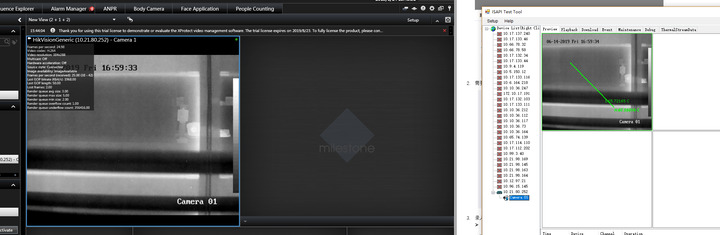
We plan to develop metadata plugin to show bouding box and rule box on smart client.
When adding Hikvision camera into Milestone,there is a build-in-metadata(together with video&audio&input etc…).
What we want is send metadata of camera via build-in-metadata to Milestone server,then our plugin extract metadata from Milestone by API of MIP.We think this is right method,also we can extract metadata of bounding box,but can’t get rule box from Milestone.
Could you please tell me the possible reason?Thank you.If any details needed,please let me know,we are pleased to provide.
Metadata should be fully supported.
You mention rule, that is one thing that Milestone lack support for. You cannot read, create or modify rules using the MIP SDK.
I have a feeling I am not sure I understand what the issue is (that it might have nothing to do with setting up rules), can you explain if you can get metadata but lack some information or it does not work at all?
Please tell me more on what you have and what you observe.
Hi Bo,
We use MIP SDK to get metadata which come from Milestone build-in metadata, then display metadata on Smart Client.
At present, we can display bounding box on Milestone, but can’t display rule line(such as the line rule used for line crossing, you can see it on Hikvision demo on attached screenshot).
I also catch packet, hope it will be helpful.
In one word,we can get some metadata(such as bounding box) from MIP sdk, but can not get others(such as rule line) from MIP SDK.
By implementing a Smart Client plugin you can do any overlay. Basically any shape can be used as overlay.
I had further test about the metadata via MIP SDK.
There are two packets, i can get metadata from one camera(“thermal” packet),but can’t get from another camera(“IPC” packet).
Could you please tell me why i can get metadata via API of MIP SDK in one camera(“thermal”),but can’t get mtadata from the other camera(“IPC”).
I guess some metadata is not the right format, so that i can’t get it form API of MIP-SDK.
Looking forward to hear your guidance.
Here is the other packet “IPC” which can’t get metadata from MIP-SDK.
In my opinion,Milestone developed device pack according to Hilvision ISAPI,so you can forward all Hikvision metadata via build-in metadada via device pack. So,we are confused about the test.
Hi,
We were using the latest device pack 10.3. The attached zip file contain short video and packet to show the details.
Hope it will be helpful to describe the details.Because this is handled in Milestone MIP SDK, we can’t continue the development about metadata internally.
Thank you in advance.
Hi. Thank you for your detailed video! We will investigate this and get back to you.
Thank you for your reply,please keep us informed once any information which may be meaningful.
Hi. The non-working XML contain time formatted as:
2019-07-04T16:16:28.400+0800
We expect this time to be in RFC339 format. Where the offset should be HH:MM.
Thank you for your information.
We changed the format to RFC339 internally, but still can’t get metadata by API of MIP SDK.
BTW, i provided two packets, one of them is in RFC339, but we can only get some metadata from API of MIP SDK.
Could you please further check possible reasons which cause the issue.
If needed, we can provide packet again.
Thank you for ou help.
Thank you, we will have a look.
We have found that we have a similar bug already, that the programmers are working on. Could you please check if you observe any of this behavior?
Metadata viewer reports that cameras are disconnected(shows Red) for all cameras about every 24-48 hrs. Customer is able to bring them online by disabling and re-enabling the metadata channel in the management client.
Customer usually just restarts the recording server as it is quicker and easier than doing that with every single camera. After doing this the cameras will remain connected for the next 24-48 hrs and the issue will happen again.
While the cameras show red in the plugin no bounding boxes are shown. After a restart or disable/enable of the metadata channel the bounding boxes will be visible again.
Constantly there is still a message in the Smart Client that bounding boxes will not be shown because they are out of sync. This message doesn’t go away even though bounding boxes are shown.
Disabling the metadata channel and re-enabling it allows the metadata to start showing in the smart client again and bounding boxes are now visible.
Hi. A small additional thing - could you please also check in Wireshark whether the connection was stopped by the device before you lose the metadata.