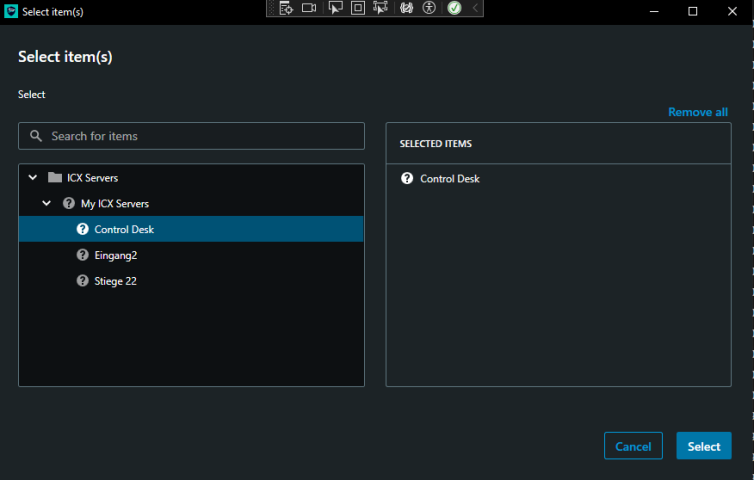
Any idea why this happens, in admin client all icons work nice but in smart client picker i got this.
I ran a quick test using the Analytics overlay plugin sample. There I get camera icons for cameras.
When you use the ItemPickerWpfWindow class what do you fill in the items property? I can test with something closer to what you are using if you let me know. Perhaps you can share a snippet of source code how you initialize and use the object.
Hi @Bo Ellegård Andersen (Milestone Systems)
Thank you for your response, I using my plugin item kind.
That’s what I am doing:
private void OnStationSelect(object sender, RoutedEventArgs e)
        {
            ItemPickerWpfWindow itemPicker = new ItemPickerWpfWindow();
            itemPicker.KindsFilter = new List<Guid>() { ICXDefinition.ICXStationKind };
            itemPicker.SelectionMode = SelectionModeOptions.MultiSelect;
            itemPicker.SearchEnabled = true;
            itemPicker.Items = Configuration.Instance.GetItems(ItemHierarchy.UserDefined);

            if (itemPicker.ShowDialog().Value)
            {
                _selectedStations = itemPicker.SelectedItems;
                BtnStationSelector.Content = _selectedStations.ToList().Count > 0
                    ? $"Selected Stations: {_selectedStations.ToList().Count}"
                    : "Select Stations";
                ApplyFilter();
            }
        }
The items when displayed in admin client and smart client (map) all look ok. Just not in the item picker.
I use the item picker in a workspace plugin.
Thanks
Unfortunately the ItemPickerWpfWindow is not capable of supporting icons for custom MIP items. It only supports the built-in items icons.
The Smart Client maps and the Management Client controls are capable of getting the icons, but if you use the “Item Picker” in the Management Client the result is the same, it will display a question-mark icon instead of the item icon.
Ok thanks, so is there an alternative sc control that can pick items via window or pop-up?
When I do this in a Smart Client plugin I do not get the custom MIP items.
_items = Configuration.Instance.GetItems(ItemHierarchy.UserDefined);
For my continued investigation, what versions are you using? Version of XProtect server? Version of Smart Client? Version of MIP SDK?
ok thats strange because its created by user it should be user defined right, I use latest mip from nuget and using currently the simens branded version 2025 (Build 15990)
Hotfixes:



Yes, strange. I suspect I might have a wrong item when testing. How is the item created? (Perhaps show with a snippet of code.)
public override Item CreateItem(Item parentItem, FQID suggestedFQID, UserControl uc)
{
    ICXStationAddUserControl stationUserControl = (ICXStationAddUserControl)uc;
    var newStation = new ICXStationItem(suggestedFQID, stationUserControl.StationName, parentItem);
    newStation.StationNumber = stationUserControl.StationId;
    CurrentItem = newStation;
    Configuration.Instance.SaveItemConfiguration(CommendPluginsGlobals.AdminClientPluginId, CurrentItem);

    if (stationUserControl.AddDoorKeySequence)
    {
        var doorOpen = new ICXKeySequenceItem(new FQID(parentItem.FQID.ServerId, suggestedFQID.ObjectId, Guid.NewGuid(), FolderType.No, CommendKinds.ICXStationKeySeq), $"Door Open", CurrentItem, 1, true);
        Configuration.Instance.SaveItemConfiguration(CommendPluginsGlobals.AdminClientPluginId, doorOpen);
    }

    if (stationUserControl.AddParkKeySequence)
    {
        var parkCall = new ICXKeySequenceItem(new FQID(parentItem.FQID.ServerId, suggestedFQID.ObjectId, Guid.NewGuid(), FolderType.No, CommendKinds.ICXStationKeySeq), $"Park Call", CurrentItem, 3, true);
        Configuration.Instance.SaveItemConfiguration(CommendPluginsGlobals.AdminClientPluginId, parkCall);
    }

    return CurrentItem;
}
public class ICXStationItem : Item
{
    public static Dictionary<Guid, bool> SensorActiveState = new Dictionary<Guid, bool>();

    private Item _parentItem;

    public ICXStationItem(FQID fqid, string name, Item parentItem)
        : base(fqid, name)
    {
        _parentItem = parentItem;
    }

    public ICXStationItem(Item item)
        : base(item.FQID, item.Name)
    {
        _parentItem = item.GetParent();
        foreach (KeyValuePair<string, string> property in item.Properties)
        {
            Properties.Add(property.Key, property.Value);
        }
    }

    public override Item GetParent()
    {
        return _parentItem;
    }


    public string StationNumber
    {
        get
        {
            if (Properties.ContainsKey("StationId"))
                return Properties["StationId"];
            return string.Empty;
        }
        set
        {
            if (Properties.ContainsKey("StationId"))
                Properties["StationId"] = value;
            else
                Properties.Add("StationId", value);
        }
    }


    public List<Item> GetKeySequences()
    {
        return Configuration.Instance.GetItemConfigurations(CommendPluginsGlobals.AdminClientPluginId, _parentItem, CommendKinds.ICXStationKeySeq);
    }

    public List<Item> GetCamerasItems()
    {
        if (!Properties.ContainsKey("RelatedCameras") || string.IsNullOrEmpty(Properties["RelatedCameras"]))
            return new List<Item>();
        var relatedCameraIds = Properties["RelatedCameras"].Split(new[] { ',' }, StringSplitOptions.RemoveEmptyEntries);
        return relatedCameraIds.Select(id => Configuration.Instance.GetItem(new FQID(id))).ToList();
    }

    public override Collection<MapAlarmContextMenu> ContextMenu
    {
        get
        {
            return new Collection<MapAlarmContextMenu>();
        }
        set { }
    }
}
Should be nothing special i tried to be close to examples =)
Just to be sure I am not on a wrong track can you verify (or correct me). You are using ItemPickerWpfWindow in a Smart Client plugin, that is where the screen capture is from?
Correct 
I was able to test now in the right way and reproduce the behavior you see. (I could use the Server Side Carrousels plugin sample.)
Unfortunately, I verified that my first answer was true, the ItemPickerWpfControl does not support the custom item’s icons.
At the same time I found an opening, an alternative for you. If you explore the Config Dump plugin sample it creates a tree, in this tree the icons are correct, maybe you can use this for developing a better “picker”.
Thanks for verifying that. I will try out the tree approche.