Good day,
Hope you all are well.
I am trying to use integrated security in my connection string when connecting to sql server database (and running commands) in background plugin.
public string BuildConnectionString(int? timeoutOverrideSeconds, string databaseOverride)
{
    if (string.IsNullOrWhiteSpace(Server))
        return null;

    string database = !string.IsNullOrWhiteSpace(databaseOverride)
        ? databaseOverride.Trim()
        : (string.IsNullOrWhiteSpace(Database) ? "DBname" : Database.Trim());

    int timeout = ConnectionTimeout < 30 ? 30 : ConnectionTimeout;
    if (timeoutOverrideSeconds.HasValue && timeoutOverrideSeconds.Value > timeout)
        timeout = timeoutOverrideSeconds.Value;

    SqlConnectionStringBuilder builder = new SqlConnectionStringBuilder
    {
        DataSource = Server.Trim(),
        InitialCatalog = database,
        ConnectTimeout = timeout,
        MultipleActiveResultSets = MultipleActiveResultSets,
        Encrypt = EncryptConnection,
        TrustServerCertificate = TrustServerCertificate,
        PersistSecurityInfo = false
    };

    if (AuthenticationType == AuthenticationType.SqlServer)
    {
        builder.IntegratedSecurity = false;
        builder.UserID = Username == null ? string.Empty : Username.Trim();
        builder.Password = Password ?? string.Empty;
    }
    else
    {
        // Current and specific Windows authentication both use Integrated
        // Security. Specific mode impersonates WindowsUsername immediately
        // before this connection is opened by DatabaseConnectionRuntime.
        builder.IntegratedSecurity = true;
    }

    return builder.ConnectionString;
}
When doing a command (a db insert) i get this log:
2026-08-05 10:22:01.973+02:00 [ 136] ERROR - DB Reconcile Failed using the saved DBName database profile (server=‘XXX-PC’, database=‘DBName’, authentication=‘Windows Specific User (XXX-PC\yyyy)’): Cannot open database “DBName” requested by the login. The login failed.
Login failed for user ‘NT AUTHORITY\NETWORK SERVICE’.
My understanding is that the background is logged on as ‘NT AUTHORITY\NETWORK SERVICE’ so the workaround i used was to ask user to enter credentials of specific windows user as i hope the screenshots can convey:
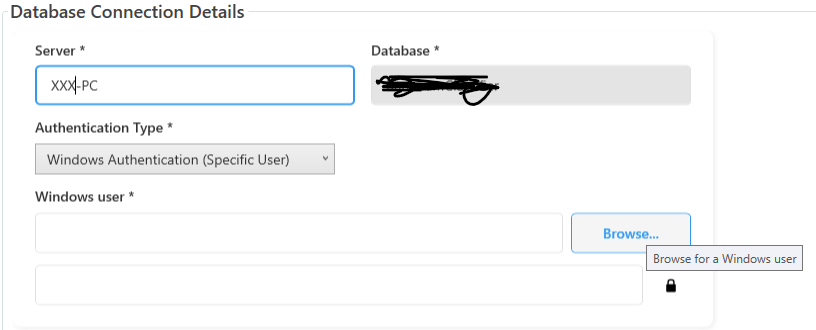
on browse for user click:

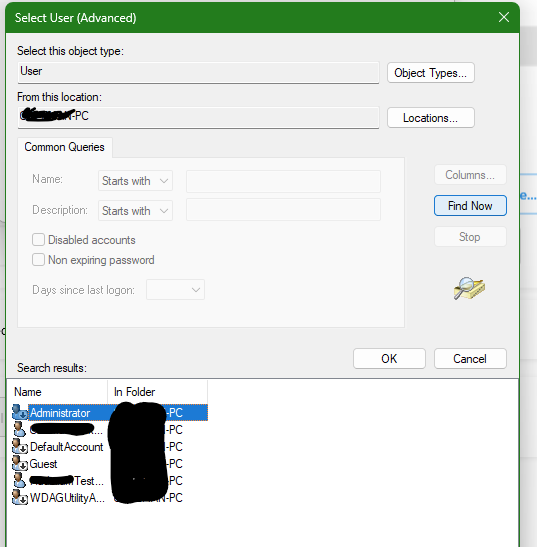
On selecting a specific user you enter the password of that user:
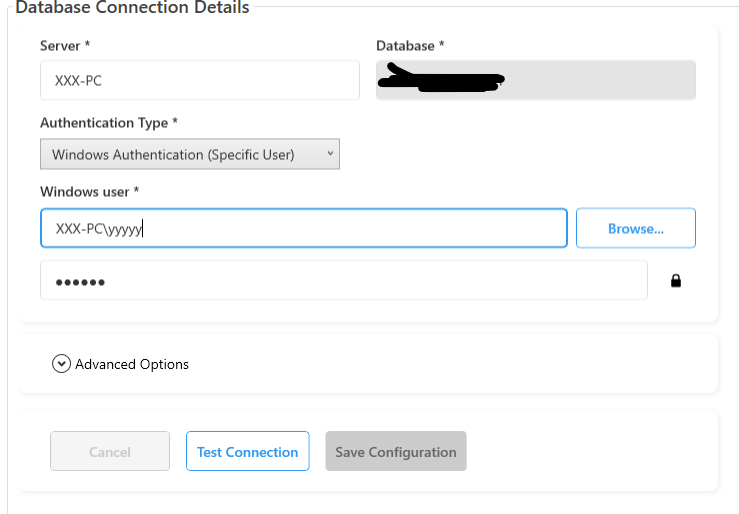
After all this we can impersonate the user from the user credentials so that we are able to use Windows Authentication
 public static T RunWithConfiguredIdentity<T>(DatabaseConnection settings, Func<T> action)
 {
     if (action == null)
         throw new ArgumentNullException(nameof(action));

     if (settings == null || !settings.RequiresWindowsImpersonation)
         return action();

     try
     {
         //try
         //{
         //    EnvironmentManager.Instance.Log(false, "DatabaseConnectionRuntime.RunWithConfiguredIdentity - before Logon/Impersonation", WindowsIdentity.GetCurrent().Name);
         //}
         //catch { }

         IntPtr token = LogonSpecificUser(settings);
         try
         {
             // Create a WindowsIdentity object from the duplicated/impersonation token
             try
             {
                 using (WindowsIdentity identity = new WindowsIdentity(token))
                 {
                     using (WindowsImpersonationContext context = identity.Impersonate())
                     {
                         //try
                         //{
                         //    EnvironmentManager.Instance.Log(false, "DatabaseConnectionRuntime.RunWithConfiguredIdentity - after Impersonation", WindowsIdentity.GetCurrent().Name);
                         //}
                         //catch { }

                         // Clear any pooled connections that may have been opened under
                         // the previous (service) account so new connections are opened
                         // under the impersonated identity.
                         try
                         {
                             SqlConnection.ClearAllPools();
                             //EnvironmentManager.Instance.Log(false, "DatabaseConnectionRuntime.RunWithConfiguredIdentity - cleared SQL pools", WindowsIdentity.GetCurrent().Name);
                         }
                         catch { }

                         return action();
                     }
                 }
             }
             catch (Exception ex)
             {
                 try { EnvironmentManager.Instance.Log(false, "DatabaseConnectionRuntime.RunWithConfiguredIdentity - impersonation failed", ex.Message); } catch { }
                 throw;
             }
         }
         finally
         {
             CloseHandle(token);
         }
     }
     catch
     {
         throw;
     }
 }
Essentially what i would like to know is is there a better way to handle db inserting and permissions when doing database commands in the background? I was thinking of having db commands in management/smart client but that would only work if the client is open.
Anyway, thanks in advance for the help!
Regards,
Coleman