Hello!
I tried MIP SDK 2018 R3 - Redistributable both x64 and x86.
I have 2 cameras in my test setup:
- “huawei IPC6126-WDL-F (192.168.1.177) - Camera 1”
- “huawei IPC6125-WDL-P (192.168.1.6) - Camera 1”
Im trying to export videos.
And i found a strange issue: x64 version of SDK works great for both cameras. But when I switch to x86 SDK, I am only able to export from second camera (huawei IPC6125-WDL-P (192.168.1.6) - Camera 1).
First camera gives VideoOS.Platform.NoVideoInTimeSpanMIPException when trying to export any existing sequence (and I know it exists cause I’m able to export it with x64 SDK).
My question is: what can it be?
I want to use x86 SDK.
I agree this is strange.
I assume that you are using the Export Sample (please correct me if wrong).
I tried it. I was unable to reproduce the issue, it works fine with a 32 bit build of that sample.
I am curious about the cameras setup. Please see if there is a difference in the setup of the two cameras that is causing this issue. If the first camera uses a different codec, bitrate, resolution or similar that causes the issue, it would be a valuable clue for me to try to reproduce the situation.
Please experiment with the settings.
If you do not find anything in the settings that is causing this issue please tell me the settings you have, the format you are trying to export and please export 1-2 minutes of video in Milestone format. Maybe I will be able to use the video from your system in Milestone format to reproduce the issue. If you cannot export because of this issue make the export for me in the Smart Client (or 64 bit version of the sample).
Hi @Bo Ellegård Andersen (Milestone Systems) !
Thanks for inspecting.
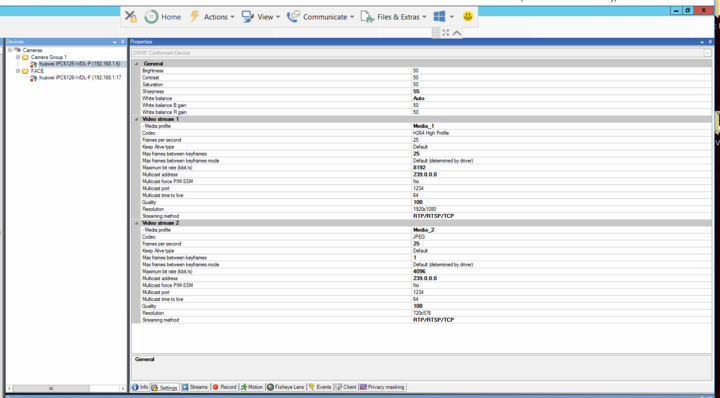
The configurations of two cameras are different:
Working export on x86 camera (192.186.1.6):
Failing export on x86 camera (192.168.1.177):
![Capture]()
Bitrates, codecs and framerates are all different.
Please do the experiment to set up the “failing” camera with the same settings as the camera that work. It would be very interesting for me to understand if the camera, for which exports are failing, with other settings will start doing video which would not cause export to fail.
@Bo Ellegård Andersen (Milestone Systems) yep, configuring failing camera same as not-failing fixed the export. Now I will try to chek if its the H265 codec setting that makes it fail on x86.
Tried to change camera codec setting to H265 and back to H264 2 times.
Confirmed - H265 codec + x86 platform combination causes failing export.
Yes. that is it.
The Smart Client and the MIP SDK share components, and for Smart Client you find that H.265 decoding requires 64-bit version of the XProtect Smart Client.
https://www.milestonesys.com/support/resources/system-requirements/
(on this page find the Smartt Client and see the note in the bottom.)
The same requirement will be that h.265 decoding requires 64-bit MIP SDK components.
So unfortunately the conclusion is that you will have to use 64 bit in order to support h.265.
Ah, thanks @Bo Ellegård Andersen (Milestone Systems)
But why is it decoding during export?
I was expecting no transformations using MKVExporter.
Hi George,
We do need to decode in some cases when you export more than one type of codec in same export. Or if you have privacy mask defined for the video. In both cases we need to trans-code to JPEG.