XProtect auto WSDD discovery not working

We are a manufacturer of ONVIF-complaint video streaming devices.

We have support for a number of VMS implementations, however with XProtect we experience an issue we were not able to cope with internally.

It looks like it has something to do with how XProtect caches information about the provisioned devices.

In general the problem is that with certain version of our software in a specific state we aren’t able to use ONVIF (auto) discovery.

As it seems the Xprotect Management Client (XMC) does not list our device despite it being probed and replying correctly with a WSDD response.

There are several observations we have already made up until now, but looks like we are unable to proceed anymore without additional support from your side.

We have observed that:

1. We still are able to add devices manually (by their IPs) in all cases

2. The other VMSs we have support for are able to discover the devices correctly

3. The sequence of ONVIF APIs called in the repro and non-repro case are different, however the payloads and our device’s responses are the same for the same API calls.

### repro

00. WSDD_Probe|
01. WSDD_ProbeMatches|
1. Device::GetServices|
2. Device::GetNetworkInterfaces|
3. Device::GetNetworkInterfaces|
4. Media::GetVideoSources|
5. Device::GetNetworkInterfaces|
6. Media::GetAudioSources|
7. Device::GetNetworkInterfaces|
8. Media::GetAudioOutputConfigurations|
9. Device::GetServices|
10. Device::GetServices|
11. Device::GetNetworkInterfaces|
12. Device::GetNetworkInterfaces|
13. Media::GetVideoSources|
14. Device::GetNetworkInterfaces|
15. Media::GetAudioSources|
16. Device::GetNetworkInterfaces|
17. Media::GetAudioOutputConfigurations|
18. Device::GetNetworkInterfaces|
19. Device::GetDeviceInformation|

### non-repro

00. WSDD_Probe|
01. WSDD_ProbeMatches|
1. Device::GetServices|
2. Device::GetNetworkInterfaces|
3. Device::GetNetworkInterfaces|
4. Media::GetVideoSources|
5. Device::GetNetworkInterfaces|
6. Media::GetAudioSources|
7. Device::GetNetworkInterfaces|
8. Media::GetAudioOutputConfigurations|
9. Device::GetServices|
10. Device::GetUsers| (failed due to insufficient permissions)
11. Device::GetNetworkInterfaces|
12. Device::GetDeviceInformation|

The sequences differ from call 10. on, however requests and replies for 9. are the same for both cases.

4. The above is all observed on XProtect 2023 r2, however it was present in older versions (presumably 2022 r3)

5. We’ve also noticed a very curious behavior: when this reproduces and wrong device password is entered the device would appear in the auto-discovery box in XMC.

Of course, at this stage, the device would not be added, but it is show on the list.

Entering correct password goes back to the same state where it is not displayed and can be added only by IP.

Questions:

1. Essentially, there is no difference in state, we were able to identify, between a device which reproduces this and a one that doesn’t.

We suspect there must be some, however we are unaware what exactly. It might be something relevant to XMC that does not seem obvious to us.

Please let us know if there’s any reason why XMC could behave differently.

2. What could be the reason for calling `Device::GetUsers` API ?

2.1. Could failing to get a response to `Device::GetUsers` be a reason why auto discovery fails ?

Please let us know if there are any additional information that we could provide and are relevant for the cause.

Hello,

If I understand correctly, you’ve tried the Express scan where the device is not discovered, and the manual add by IP where the device is successfully discovered.

Have you tried the IP range scan, and does it behave the same way as Express?

To help us investigate, could you please provide wireshark traces for all scenarios:

  1. Successful adding by IP (using the Auto-detect option)
  2. Express scan with correct password
  3. Express scan with incorrect password
  4. IP Range scan with correct password
  5. IP Range scan with incorrect password

BR,

Gabriela

Hello, Gabriela,

thank you for a brief response.

Please have a look at the pcaps from different scenarios

Just a side note to mention:

the ‘wrong password’ scenarios are actually the ones where I pick the ‘factory default’ rather than enter wrong password.

imageThen the behavior is that the hardware shows up on the list but I am not able to add it because it says it needs ‘preconfiguration’ first, AFAIK adding a dedicated user.
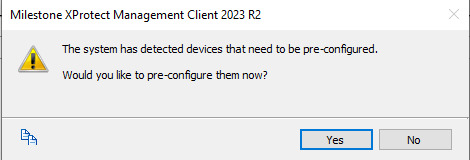
If I select ‘no’ the device remains “not configured” and I am unable to add it

image

I am not sure why I have not experienced the preconfiguration before .

In any case using “wrong credentials” does not show the device at all now.

Kind regards

@Gabriela Tzanova​ Could you take a look at our capture files ? Thank you

Hi Pawel,

I have, but am not yet sure what’s causing the issue - my current suspicions are that the device IP being localhost may be somehow playing a role here. Are you experiencing the same issue when using a different IP for the device?

Also, just to confirm, what is the behavior you’re experiencing when using the address range scan - is the device getting listed (including the case when the device IP is localhost)?

Regarding the preconfiguration message you are now receiving, it seems to be caused by the unauthenticated call to GetUsers returning a successful result, which is used to determine if the device is in a factory-default state. Please refer to this article: Detecting Factory Default State

Have you made any changes on the device side, regarding the result of the GetUsers call (as you initially mentioned a failed GetUsers in the non-repro case, which I assume is the successful add)?

Could you also confirm the DevicePack version you’re using?

BR,

Gabriela

Hello, Gabriela,

sorry for such long time to make a response.

> Are you experiencing the same issue when using a different IP for the device?

Yes, changing the IPs does not do any difference.

> Also, just to confirm, what is the behavior you’re experiencing when using the address range scan - is the device getting listed (including the case when the device IP is localhost)?

We’ve never used a case where the device IP was localhost.

When we use address range scan it shows up in the same manner as if when ‘manual’ is used, which is the device shows up normally.

> Have you made any changes on the device side, regarding the result of the GetUsers call

No, I think the behavior we have right now was always as is. It’s either this problem has been dug out only now or (as I initially thought) something has changed in one of the Milestone versions.

The behavior we have now is we always authenitcate `GetUsers` regardless of what its result might be.

As I understand from the doc, in order to make the preconfiguration work right, we should sometimes skip authentication and provide an empty list of users, do I understand correctly ?

> Could you also confirm the DevicePack version you’re using?

What is a DevicePack ?

br,

- Pawel

@Gabriela Tzanova​ Hello, Gabriela, could you give me the update for this ?

Hello Pawel,

Milestone expect GetUsers to fail with empty user+password if the the device is not in factory default state.

According the https://www.onvif.org/specs/core/ONVIF-Core-Specification.pdf section: 8.4.3 the access class for this command is READ_SYSTEM_SECRET.

This is why Milestone treats an empty response as allowing ‘anonymous’ access, that should only be possible when the device is in factory default state.

Hence the message box “The system has detetced device that need to be pre-configurated” is shown.

Together with new Wireshark logs, please provide us debug logs from the discovery process.

To enable debug logs do the following:

1. Stop recording server(RS)

2. Add the following section on the top in the file:

“[C:\ProgramData\VideoDeviceDrivers\C_\Program](file:C:/ProgramData/VideoDeviceDrivers/C_/Program) Files (x86)\Milestone\XProtect Recording Server\Drivers\NativeDrivers\Devices.ini”

[logging]

level=5

sink=3

file_size=20

max_files=5

3. Fill free to remove the whole log folder before the next step: [C:\ProgramData\Milestone\XProtect](file:C:/ProgramData/Milestone/XProtect) Recording Server\Logs\Drivers\*

4. Start RS

5. Recreate the issue: do “Express” scan

ZIP and upload the logs folder, wireshark logs and the following file:

[C:\ProgramData\Milestone\XProtect](file:C:/ProgramData/Milestone/XProtect) Recording Server\Logs\HardwareDiscovery.log

BR,

Gabriela

Gabriela, I will create the logs soon, however

I still don’t understand the requirement.

You’ve elaborated this quite clearly and as I understand for a factory default state we should always authenticate `GetUsers` call, even if it contains no auth credentials (empty user+password) on order for Milestone to work.

It looks to me, but I might be wrong, this is really against the documentation which specifically mentions that READ_SYSTEM_SECRET ONVIF APIs should only be available to onvif administrator level users (paragraph 5.9.3.3 of the doc you linked).

Please explain this discrepancy. I think I don’t understand the requirements fully here …

Hello Pawel

According to provided Wireshark logs(express-correct.pcap, express-incorrect.pcap) - we have successful call to GetUsers with empty credentials.

Hence Milestone will treat the device in factory default state and will trigger setup procedure as described here:

https://doc.milestonesys.com/latest/en-US/onvifdriver/detecting_factory_default.htm

We recommend for already configured device GetUsers to get failed with empty credentials: for example to return 401(Unautorized) with no HTTP Authorization, and 500(Internal Server Error) with HTTP Authorization

Thanks,

Georgi

@Gabriela Tzanova@Georgi Georgiev

Hello, thank you for all your efforts.

I have now implemented the logic for `GetUsers` API. However it seems that this does nothing to the cause, because we simply were creating correct responses from the beginning.

Our service does respond 401 EVERY time wrong credentials are used or no credentials are supported, no matter the state of the service. In fact our service does not support the ‘factory state’ where no credentials is needed to use its ONVIF Api.

The admin always needs to know the credentials in order to use ONVIF with our devices.

So, to sum up, I am back to square one.

Moreover I’ve noticed that for repro/no-repro case I even see that `GetUsers` is not called at all, but Milestone Client shows/does not show our device upon discovery based on something else.

What that is ? I only suspect it has something to do with authorization.

I’ve made a test with @Gabriela Tzanova​ 's directions how to enable logs for the Milestone recording service.

The other logs are dumps from HTTP/SOAP communication recorded on our service end. It also contains XML payloads to take a deep look into.

This has been made with clean install of Milestone 2023 R2 & device pack v12.7a .

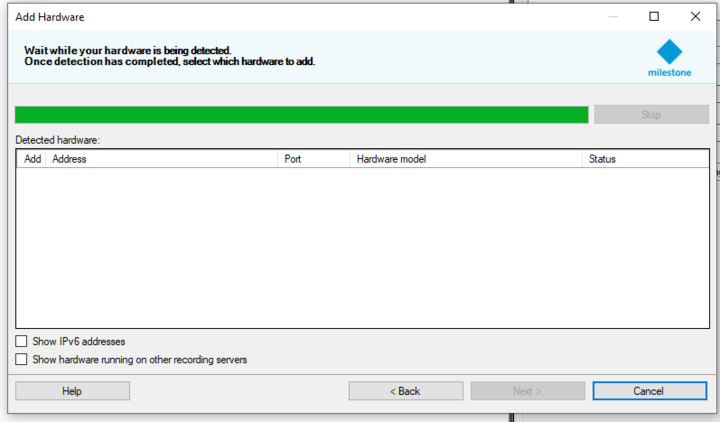
Like I’ve written in the first post: when I use the correct credentials for the one-and-only admin ONVIF user Milestone does not show the device in the discovered devices list (although there is some communication going on) - see logs `service-log.repro.filtered.txt` & `Log-milestone-repro.zip` (Milestone recording service) .

When I use wrong credentials the device is shown, but with error saying password is wrong (`service-log.filtered.txt` & `Log-milestone.zip`).

image

Please let us know if you need any other information.

We are unable to move further from here without your assistance.

Best regards,

- Pawel

@Gabriela Tzanova@Georgi Georgiev

Hello, did you find some time to address our problem ?

Thank you!

Hi Pawel,

We have not yet identified the root cause, and will need to conduct a deeper investigation. Please contact our Milestone Technology Partner Program - partner@milestone.dk, so this request can be evaluated and prioritized internally.

BR,

Gabriela

After a long investigation there was a fix we found – provide a single `VideoSource` in the config, where previously we could have more than once.

1 Like

Did you find any other Workaround for this yet? Normally having the option for more than one VideoSource might come in usefull

Hello,

We are working on enabling Express device discovery in Milestone XProtect with ITVDesk - Onvif IP Camera.

Our device responds correctly to WSDD Probe/ProbeMatches and manual ONVIF add works without issues.

However, the device does not appear in the discovery list.

We are currently returning XAddrs:
http://:7000/onvif/device_service

Could you please confirm:

  1. Does XProtect require the ONVIF device service to be available on:
    http:///onvif/device_service (port 80)?

  2. Is XAddrs with custom ports ignored during discovery?

  3. Is our ProbeMatches XML structure generally acceptable for XProtect,
    or are there any strict requirements regarding format, namespaces, or fields?

<?xml version="1.0" encoding="UTF-8"?>

<s:Envelope xmlns:s=“http://www.w3.org/2003/05/soap-envelope”
xmlns:wsa=“http://schemas.xmlsoap.org/ws/2004/08/addressing”
xmlns:d=“http://schemas.xmlsoap.org/ws/2005/04/discovery”
xmlns:dn=“http://www.onvif.org/ver10/network/wsdl”
xmlns:tds=“http://www.onvif.org/ver10/device/wsdl”>
<s:Header>
wsa:MessageIDuuid:…</wsa:MessageID>
wsa:RelatesTouuid:…</wsa:RelatesTo>
wsa:ToWS-Addressing Anonymous Role</wsa:To>
wsa:Actionhttp://schemas.xmlsoap.org/ws/2005/04/discovery/ProbeMatches</wsa:Action>
</s:Header>
<s:Body>
<d:ProbeMatches>
<d:ProbeMatch>
wsa:EndpointReference
wsa:Addressurn:uuid:…</wsa:Address>
</wsa:EndpointReference>
<d:Types>dn:NetworkVideoTransmitter tds:Device</d:Types>
<d:Scopes>onvif://www.onvif.org/Profile/Streaming …</d:Scopes>
<d:XAddrs>http://:7000/onvif/device_service</d:XAddrs>
<d:MetadataVersion>1</d:MetadataVersion>
</d:ProbeMatch>
</d:ProbeMatches>
</s:Body>
</s:Envelope>

Our goal is to ensure the device appears in Express discovery without manual configuration.

Please create a new topic for this question.
Even if it is related to a previously solved issue, continuing an old thread makes it harder for others to find relevant answers later. Creating a new topic significantly improves the usability and searchability of the forum for everyone.

You can of course reference the older topic in your post if it is relevant.