Xprotect Client plugin, custom MKV export, progress bar does not update.

Hi, for a client workflow, we have made a custom export function using the MKV exporter from the sdk. We using Xprotect client 23.3.61.1 (buidl 61) Hotfix.202412122001.SC.23.31.61.209 , and the latest SDK version.

The MKV exports properly, and fast. And the SDK integration triggers a export bar on screen in the Xprotect client. In testing all went well, but in production, most of the time the export bar does not update, and gets stuck.

Ideally we don’t show the export bar, but i doubt i can disable it, or auto close it. ( users export often, and the 3 bars take up screen space and cause extra workload to remove )

But when testing now it gets stuck and also its a pita to remove, ( because you need to cancel and it cant cancel, because there is no active export)

I suspect, the export ( 60 seconds of low res ) is just to fast most of the times and triggers are missed.

I dont want to make a back-end service for handling this, but i might need to. Any suggestions?

Screenshot in dutch, all these exports are done and available on the local drive.
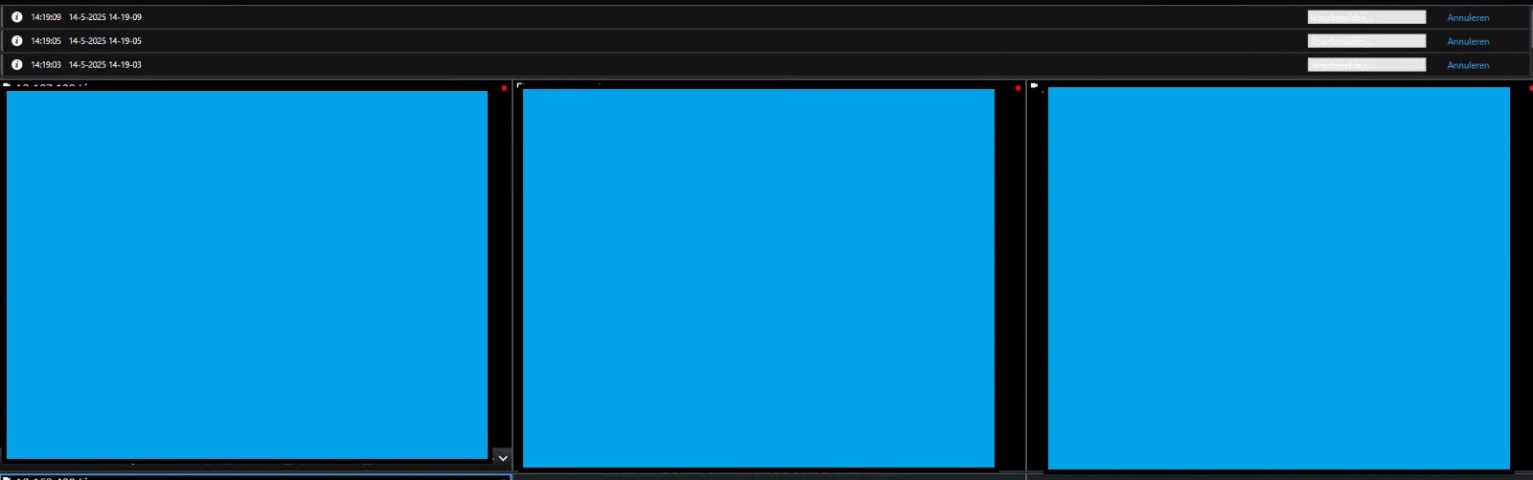
My first idea was that I could reproduce this with the SCExport plugin sample, it only exports 15 seconds, but that works fine.

Can you please have a look at the sample and see if you do the export in a similar way compared to that sample?

https://doc.developer.milestonesys.com/html/index.html?base=samples/pluginsamples/scexport/readme.html&tree=tree_1.html

https://github.com/milestonesys

Maybe you can try the sample in production environment and see if it has the same issue.

At your production site: Do all exports end like this? If not, is there a pattern as to which fails and which succeeds? Do all of the Smart Clients see the issue or only some? Do you see the issue on all cameras or only some?

It would be very interesting if the issue follows a certain camera model , or camera setting, please see if you can find anything that will give us clues.

        private async Task SaveMKV(Item videoSource)
        {
            string cameraName = videoSource.Name;
            if (cameraName.Length > 10)
            {
                cameraName = cameraName.Substring(0, 10);
            }
            cameraName = cameraName.Replace(".", "_");
            cameraName = cameraName.Replace(" ", "_");
            cameraName = DateTime.Now.ToString("HH_mm_") + cameraName + ".mkv";
 
            _exporter = new MKVExporter();
            _exporter.Filename = cameraName;
            _exporter.Path = _exportPath;
            _exporter.Init();
            _exporter.CameraList.Add(videoSource);
            _exporter.StartExport((DateTime.Now.AddSeconds(-60)),DateTime.Now);
        }

Hi sorry for not getting back to you, this is on my todo list, and i will look if i see a pattern in camera types. For now this is the code i use, maybe that gives a hint, i will test the plugin and test both clients within a couple days.

Yes, please answer the questions on how how wide spread the issue is and if there are patterns… Thank you for the first update.

So sorry it took forever.

100% sure when it happens. If its a single view its fine. If its a multiview with more than 3 or sometimes 4 its not. As soon as you switch to single view it updates.

I also updated to the latest 2024 version with latest hotfix. Same issue.

Related isseu , search is also running poorly in multi-view, but not single view. I think i need to make a support case for that issue, but somehow they do seem related.

Debug on the client:

2025-06-09 01:31:58.938+02:00 [ 1] DEBUG - Telemetry Track Page View: name:MKVExporter Initialized, id: , duration: , properties:{[Identifier, VideoOS.Platform.Data.MKVExporter],[environmentID, SC]}, metrics:{}

2025-06-09 01:31:58.982+02:00 [ 1] INFO - Export job created.

2025-06-09 01:31:58.992+02:00 [ 36] INFO - ExportJob named ‘9-6-2025 01-31-58’ is started.

2025-06-09 01:31:59.001+02:00 [ 36] DEBUG - Telemetry Track Event: eventName:Export started, properties:{[Export job id, b00bd9c9-864a-4ce6-aa36-ae87ee61f8ef],[Number of items, 1],[Export to optics, False],[Export to path, True],[Number of items with privacy mask, 0],[Number of sequences, 1],[Export list reorder number of items moves, 0],[Export list reorder total moves, 0],[Media player format, True],[Selected format, VideoOnly],[Selected output type, MKV],[Merged files, False],[environmentID, SC]}, metrics:{}

2025-06-09 01:32:00.184+02:00 [ 36] DEBUG - Telemetry Track Event: eventName:Export finished, properties:{[Export job id, b00bd9c9-864a-4ce6-aa36-ae87ee61f8ef],[Reason, Completed],[Export job duration in seconds, 1.1846208],[Export camera duration in seconds, 60],[Export list order, None],[Export size in bytes, 18779165],[environmentID, SC]}, metrics:{}

2025-06-09 01:32:00.189+02:00 [ 36] INFO - Export job ‘9-6-2025 01-31-58’ ended.

2025-06-09 01:32:00.189+02:00 [ 36] INFO - ExportJob named ‘9-6-2025 01-31-58’ has ended.

Do you know for sure if these exports are actually completing? I have seen a small number of customer environments where exporting H.265 data to MKV hangs indefinitely and the exporter’s “Progress” property remains at zero. In my experience the export can be successfully cancelled, but there is no indication in the logs or in the error properties on the exporter about why it was hanging.

so far, yea they all finish.

I would like to try to reproduce the issue in the Milestone test lab. Can you give me a minimal implementation plugin (source code) and instructions so that I can attempt to reproduce and debug?

(If you want to give me a plugin but not share it with the public forum, let me know.)

using System;
using System.Collections.Generic;
using System.Threading;
using System.Threading.Tasks;
using VideoOS.Platform;
using VideoOS.Platform.Client;
using VideoOS.Platform.Data;
 
 
namespace Exporter.Client
{
    class ViewItemToolbarVideo: ViewItemToolbarPluginInstance
    {
        private Item _viewItemInstance;
        private Item _window;
        MKVExporter _exporter = null;
        private static string _exportPath = System.IO.Path.Combine(Environment.GetFolderPath(Environment.SpecialFolder.MyVideos), "Export");
 
        public override void Init(Item viewItemInstance, Item window)
        {
 
            _viewItemInstance = viewItemInstance;
            _window = window;
 
            Title = "Exporter to Video";
            Tooltip = "Exporter to Video";
            Icon = Properties.Resources.video;
            //cck if path exists if not make it
            if (!System.IO.Directory.Exists(_exportPath))
            {
                System.IO.Directory.CreateDirectory(_exportPath);
            }
        }
 
        public override async void Activate()
        {
            Icon = Properties.Resources.video_red;
 
            await SaveMKV(CameraNameResolver.ResolveCamera(_viewItemInstance, _window));
 
            System.Windows.Forms.Timer timer = new System.Windows.Forms.Timer();
            timer.Interval = 60000;
            timer.Tick += (sender, e) =>
            {
                Icon = Properties.Resources.video;
                timer.Stop();
                timer.Dispose();
            };
            timer.Start();
        }
 
 
        public override void Close()
        {
 
 
        }
 
        private async Task SaveMKV(Item videoSource)
        {
            string cameraName = videoSource.Name;
            if (cameraName.Length > 10)
            {
                cameraName = cameraName.Substring(0, 10);
            }
            cameraName = cameraName.Replace(".", "_");
            cameraName = cameraName.Replace(" ", "_");
            cameraName = DateTime.Now.ToString("HH_mm_") + cameraName + ".mkv";
 
            _exporter = new MKVExporter();
            _exporter.Filename = cameraName;
            _exporter.Path = _exportPath;
            _exporter.Init();
            _exporter.CameraList.Add(videoSource);
            _exporter.StartExport((DateTime.Now.AddSeconds(-60)),DateTime.Now);
            await Task.Run(() =>
            {
                while (_exporter.Progress < 100)
                {
                    Thread.Sleep(500);
                }
            });
 
 
        }
    }
 
    class ViewItemToolbarPluginVideo : ViewItemToolbarPlugin
    {
        private static readonly Guid PluginId = new Guid("AA338CAF-0503-4FC7-87BA-CE9D3232D7D8");
 
        public override Guid Id
        {
            get { return PluginId; }
        }
 
        public override string Name
        {
            get { return "Export video"; }
        }
 
        public override ToolbarPluginOverflowMode ToolbarPluginOverflowMode
        {
            get { return ToolbarPluginOverflowMode.AsNeeded; }
        }
 
        public override ToolbarPluginType ToolbarPluginType
        {
            get { return ToolbarPluginType.Action; }
        }
 
        public override void Init()
        {
            ViewItemToolbarPlaceDefinition.ViewItemIds = new List<Guid>() { ViewAndLayoutItem.CameraBuiltinId, ViewAndLayoutItem.HotspotBuiltinId };
            ViewItemToolbarPlaceDefinition.WorkSpaceIds = new List<Guid>() { ClientControl.LiveBuildInWorkSpaceId };
            ViewItemToolbarPlaceDefinition.WorkSpaceStates = new List<WorkSpaceState>() { WorkSpaceState.Normal };
        }
 
        public override void Close()
        {
        }
 
        public override ViewItemToolbarPluginInstance GenerateViewItemToolbarPluginInstance()
        {
            return new ViewItemToolbarVideo();
        }
    }
}

i assume this is enough ? i did change some property names for anonimaty, but this is the full code from that funciton.

Edit: could the GUID be the issue ? do alle items in multiview have te same GUID? is this a problem ?

Can you please give me the CameraNameResolver.ResolveCamera() method also?

I think I figured it out, I think you use a slightly modified method from the Toolbar plugin sample, I am testing…

I cannot reproduce. I have multiple views across multiple screens, I put a lot of exports on queue, yet it has successfully exported every time. I tried also to put a camera in the mix with nothing recorded, here it successfully fails the way I expected, and continues then to export other cameras. I there anything you can think of that can increase my chance to reproduce?

Have you seen the issue in multiple installations? At customer or in your development / test site?

Hi i think i have found the issue. Not sure if you can look up support cases but: MSC2090787 is another issue i had, And it is related.

Long story short , don’t use xprotect client via VNC when no real display is connected, stuff will not work properly! Even if its rendering on GPU nicely. I guess something will go wrong in the background. This also happens when using RDP when the display is not initialized on the system. Thats why its been working in testing, my test setup is a laptop, and my other setup with VNC had a real display. This final setup does not have a display. Sorry to waste your time on this. Unless you have a solution for this edge case. At the moment i ordered some dummy display plugs to try and fix it that way. not sure if it will work.