XProtect Corporate 2024 R1 ExtenalMessage.Deserialize ():Unable to deserialize class

Hello,

I get the following error from my plugin running in a SmartClient on a Win 10 workstation:

Error: ExtenalMessage.Deserialize ():Unable to deserialize class:BoschPTZWiperPlugin.CommData, BoschPTZWiperPlugin, Version=3.24.1.1, Culture=neutral, PublicKeyToken=null, Exception:Value cannot be null.

Parameter name: type

The same plugin runs on the management server without any problems.

My assumption was that a firewall was causing the problem, but all necessary ports should be open.

What else does this error message suggest? And where should I look for it in the plugin?

I believe there is a known issue that should be solved if you apply the patches to 2024R1. Please check if you have the latest patches, especially those for the Event Server.

https://supportcommunity.milestonesys.com/KBRedir?art=000062000&lang=en_US

Hello Bo,

these are the patches that have already been rolled out on the system:

I guess we have to roll out the latest patch anyway, right?

Best regards

We have now rolled out the latest patch on the system, unfortunately the error is still there.

We have now rolled out the latest patch on the system, unfortunately the error is still there.

The log still shows the same message:

MIPLog.TXT:

2025-06-16 12:49:29.598+00:00 [ 45] DEBUG - Debug: SendMessage ():SmartClient.SmartClientMessageCommand to ApplicationMessageManager.SmartClientMessageHandler

2025-06-16 12:49:29.598+00:00 [ 45] DEBUG - Debug: SendMessage ():SmartClient.SmartClientMessageCommand to CommunicationClient.MessageHandler

2025-06-16 12:49:30.093+00:00 [ 1] DEBUG - Debug: WiperOffItem ():CheckLicense LicenseState=0

2025-06-16 12:49:30.594+00:00 [ 1] DEBUG - Debug: WiperOffItem ():CheckLicense LicenseState=0

2025-06-16 12:49:31.094+00:00 [ 1] DEBUG - Debug: WiperOffItem ():CheckLicense LicenseState=0

2025-06-16 12:49:31.595+00:00 [ 1] DEBUG - Debug: WiperOffItem ():CheckLicense LicenseState=0

2025-06-16 12:49:32.096+00:00 [ 1] DEBUG - Debug: WiperOffItem ():CheckLicense LicenseState=0

2025-06-16 12:49:32.597+00:00 [ 1] DEBUG - Debug: WiperOffItem ():CheckLicense LicenseState=0

2025-06-16 12:49:32.620+00:00 [ 45] DEBUG - Debug: SendMessage ():SmartClient.SmartClientMessageCommand to ApplicationMessageManager.SmartClientMessageHandler

2025-06-16 12:49:32.620+00:00 [ 45] DEBUG - Debug: SendMessage ():SmartClient.SmartClientMessageCommand to CommunicationClient.MessageHandler

2025-06-16 12:49:32.704+00:00 [ 13] DEBUG - Error: ExtenalMessage.Deserialize ():Unable to deserialize class:BoschPTZWiperPlugin.CommData, BoschPTZWiperPlugin, Version=3.24.1.1, Culture=neutral, PublicKeyToken=null, Exception:Value cannot be null.

Parameter name: type

2025-06-16 12:49:32.706+00:00 [ 13] DEBUG - Error: ExtenalMessage.Deserialize ():Unable to deserialize class:BoschPTZWiperPlugin.CommData, BoschPTZWiperPlugin, Version=3.24.1.1, Culture=neutral, PublicKeyToken=null, Exception:Value cannot be null.

Parameter name: type

2025-06-16 12:49:33.098+00:00 [ 1] DEBUG - Debug: WiperOffItem ():CheckLicense LicenseState=0

_2025-06-16 12:49:33.598+0_0:00 [ 1] DEBUG - Debug: WiperOffItem ():CheckLicense LicenseState=0

and ClientLog.TXT:

2025-06-16 12:49:20.648+00:00 [ 1] DEBUG - ApplicationController.SelectedViewItem for window id 00000000-0000-0000-0000-000000000000 has changed to:

2025-06-16 12:49:20.653+00:00 [ 1] DEBUG - ApplicationController.SelectedView for window id 00000000-0000-0000-0000-000000000000 has changed to: Wiper service

2025-06-16 12:49:20.653+00:00 [ 1] DEBUG - ApplicationController.SelectedGroup for window id 00000000-0000-0000-0000-000000000000 has changed to: Service

2025-06-16 12:49:20.909+00:00 [ 1] DEBUG - ApplicationController.SelectedViewItem for window id 00000000-0000-0000-0000-000000000000 has changed to: 05.05.0053 Stern View (PTZ OPT) M–8

2025-06-16 12:49:20.911+00:00 [ 1] DEBUG - ApplicationController.HotspotCamera for window id 00000000-0000-0000-0000-000000000000 has changed to: 19e72208-67e2-4659-b0cf-44106470f21d

2025-06-16 12:49:20.911+00:00 [ 1] DEBUG - ApplicationController.LocalHotspotCamera for window id 00000000-0000-0000-0000-000000000000 has changed to: 19e72208-67e2-4659-b0cf-44106470f21d

Best regards

Andreas
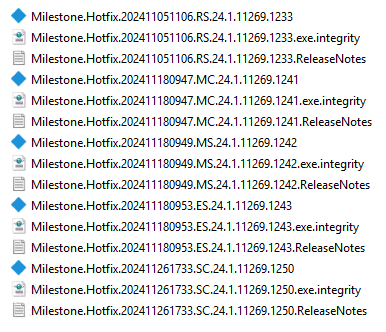
The way I understand the issue mentioned as MCC-160 in the patch release note. The issue is that the Event Server MIP logs are filling with these messages “Error: ExtenalMessage.Deserialize ():Unable to deserialize” but the functionality otherwise works as expected. The original report from which there was later a patch developed is here. - https://developer.milestonesys.com/s/question/0D5bH0000016cTvSAI/event-server-mip-logs-showing-errors-and-filling-up-drive-with-logs-when-using-custom-message-communication

One doubt of mine, can you confirm that it is the logs in this location that are filling? -[C:\ProgramData\Milestone\XProtect](file:C:/ProgramData/Milestone/XProtect) Event Server\logs\MIPLogs

Ok, I didn’t tell you that, the log entries are not from the Event Server but from the Smart Client.

I have activated debugging in the Smart Client in the Advanced Settings.

And the Smart Client is running on a separate workstation.

I have checked the logs from the event server. I did not find any matching entries here.

The logs look clean.

The Smart Client has also been patched.

You might have patched the Smart Client (SC), but I don’t think Milestone made a fix, the fix was for Event Server (ES), and I guess I assumed you were in the ES. (The other case was about sending something from SC and seeing excessive logging in ES.)

I can ask Milestone Development if they think it is the same issue and whether it is possible to port the ES fix to a SC fix. Before I ask this, please answer me this; is the issue only in excessive logging or is the functionality also failing?

The error does not generate excessive logging, but causes the Smart Client to hang.

My big problem is that I cannot reproduce it here on my test system.
So debugging is not possible here.
And I can’t debug on the system on board, unfortunately that’s not possible remotely via satellite.

I must conclude that I was pointing to a fix that didn’t fit the issue.

I assume you have some MessageCommunication, TransmitMessage or similar, in your Smart Client plugin. Please try to give a overview of what is used when.

I would like to see the full logs, please upload here or on a support case. I need the logs for the report to Milestone Development.