XProtect Onvif Driver Automatic Remote Recording Retrieval Problem with WS-UsernameToken Auth

I am working with getting a profile G device to operate with XProtect’s remote recording retrieval feature. I have had to add the following code in the device to get it to work – the code means that the device allows the Onvif Soap request even if there is no user authentication provided by XProtect.

//The following are needed for Milestone's Video Retrieval functions

else if (soap_strcmp(request, “GetVideoSources”) == 0 ||

        soap\_strcmp(request, "GetProfiles") == 0 ||

        soap\_strcmp(request, "GetRecordingSummary") == 0 ||

        soap\_strcmp(request, "GetMediaAttributes") == 0 ||

        soap\_strcmp(request, "FindRecordings") == 0 ||

        soap\_strcmp(request, "GetRecordingSearchResults") == 0 ||

        soap\_strcmp(request, "EndSearch") == 0 ||

        soap\_strcmp(request, "GetReplayUri") == 0 ||

        soap\_strcmp(request, "GetRecordingJobs") == 0 ||

        soap\_strcmp(request, "GetAudioSources") == 0)

{

   return TRUE;

}

Without this then XProtect cannot get the device to respond to GetVideoSources and the retrieval process hangs. I don’t want to relax the security around these Onvif requests, especially the GetRecordingSummary, FindRecordings, GetRecordingSearchResults, GetReplayUri and GetRecordingJobs requests.

The device is using legacy WS-UsernameToken Auth. This appears to operate fine when adding the hardware to XProtect and for XProtect to retrieve the stream, but not for the recording retrieval.

I have attached a Wireshark of the communication when adding the hardware to XProtect in the Management Client then performing a manual recording retrieval in the Smart Client. The Smart Client shows the Retrieval job status but it is “stuck” with status In Progress and no progress bar.

I am using XProtect version 2024 R1 with a Professional+ Test Licence and Device Pack 13.2a. I am using the ONVIF driver.
Hi Cliff Ede,

I hope this message finds you well!

Regarding the described problem, please find in the comment below where the problem may come from and how you can solve it.

Regarding the provided wireshark, an issue has been figured out for not having information about video-source-token at the moment when you want to retrieve data. Please find more information in the message.

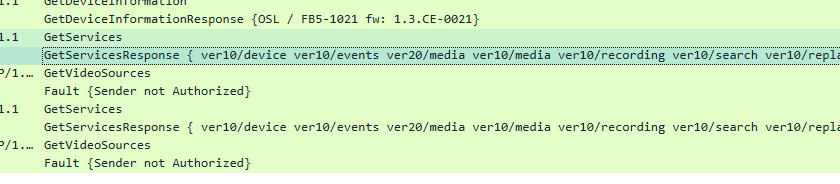
For example in the beginning, when you add the device, all responses, from the device perspective, have been populated with the right information. Here I mean GetServices, GetProfiles, GetVideoSources, etc.

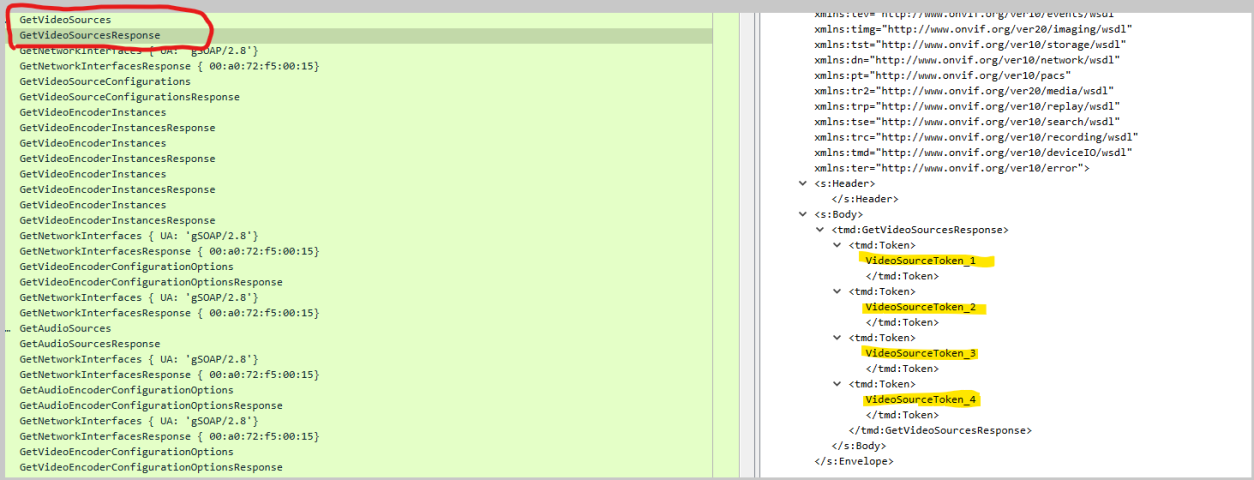
And especially GetVideoSources which is filled with the right information, regarding different tokens.

//picture from the beginning of the Wireshark trace, when you mentioned a successful attempt to add the camera to XProtect.

First, let’s mention that GetServicesResponse has the same content at all different times when it was called, which means we have received the right information.

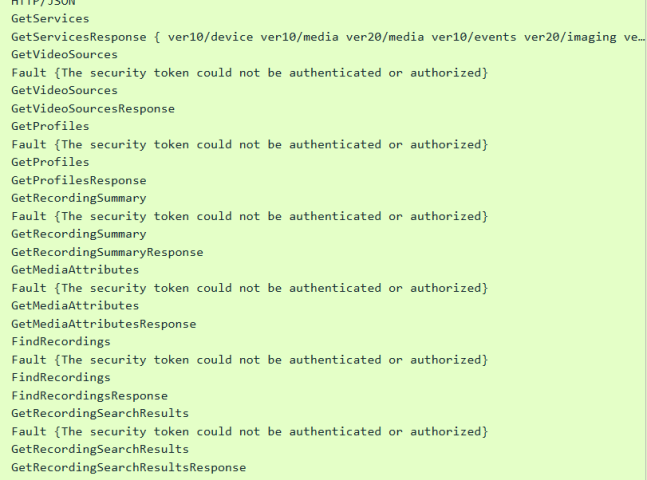
Let’s scroll down to the end of the Wireshark trace, where the possible recording attempt has happened.

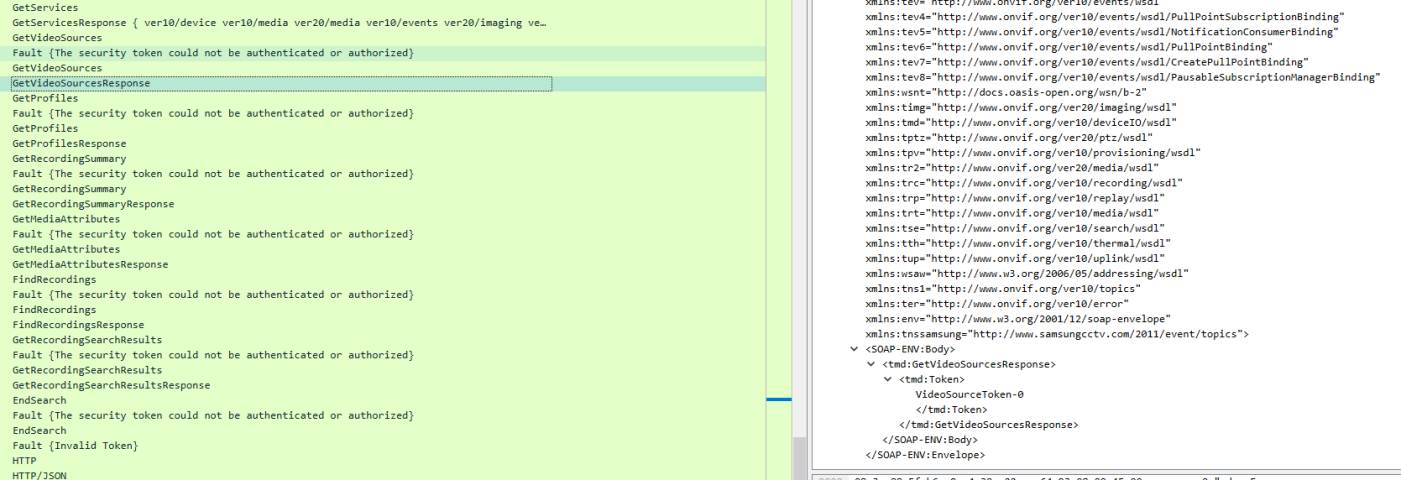
And the problem comes with the next additional responses regarding GetVideoSourcesResponse.

From the picture above, you can see how looks like a typical response to a GetVideoSource request.

// GetVideoSourcesResponse at the end of the trace.

You can see that we have missed the video source token information, which prevents us from continuing the recording requests.

// picture from the end of Wireshark trace

Here, you see that we have tried 2 times to receive proper information about the GetVideoSources response, but were unsuccessful. That is why we cannot proceed with retrieving the data.

// For example successful retrieval of data from another camera

We have all needed requests like GetVideoSourcesResponse, GetProfilesResponse, GetRecordingSummaryResponse, etc.

//From the same picture, the response of GetVideoSources. The video token is added in the <SOAP-ENV: Body>

So, based on the provided wireshark trace and the questions that you came up with, we could conclude that missing information in the GetVideoSourceResponse caused the problem, and more closely, it is because of not having the information about the video-source-token.

Kind regards,

Genadi

Hi Genadi,

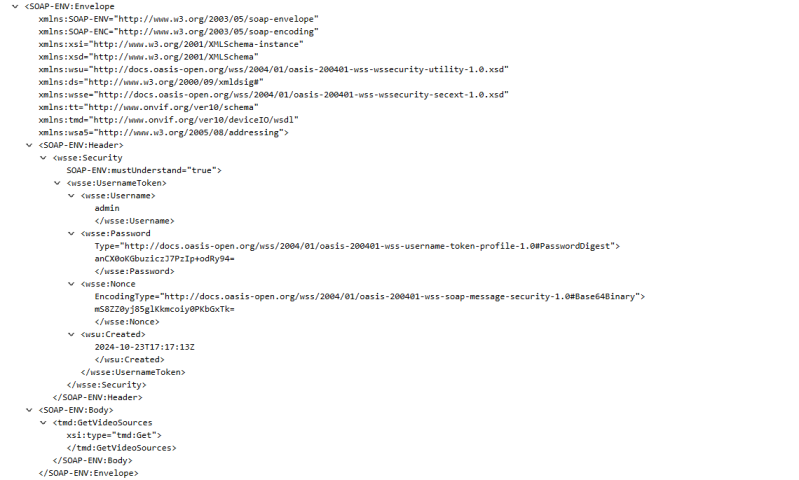
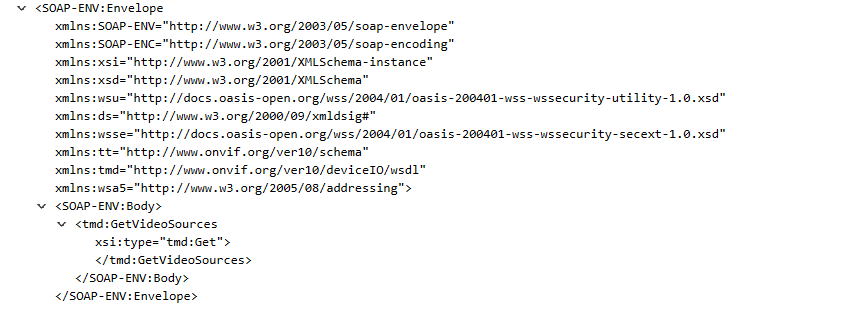
I think the fundamental problem is that when adding the device, Milestone is prepared to use WS-UsernameToken auhentication. Here is an example of Milestone doing it for the GetVideoSources request:

Milestone is passing the UsernameToken in the header part of the SOAP message to allow the message to be authenticated.

However, when the same request is sent later for the video retrieve, a UsernameToken is not sent:

There is no header provided in this message and therefore no UsernameToken for authentication. This is hence rejected by the device.

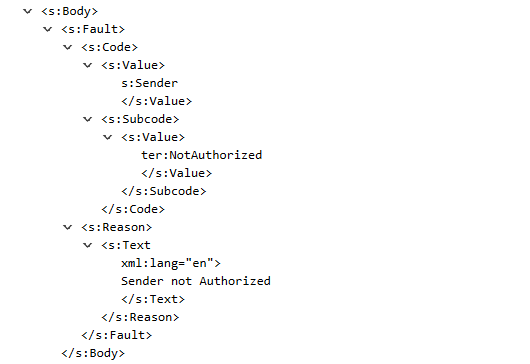
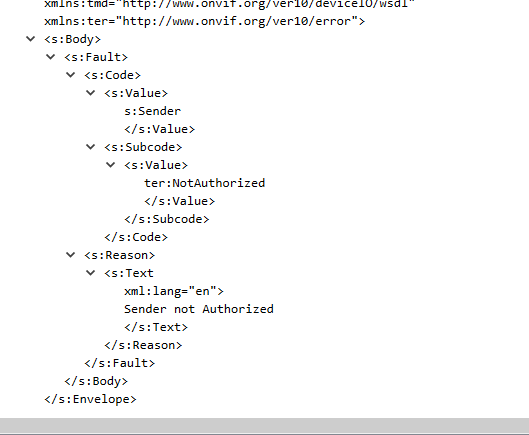
The device returns the NotAuthorized fault code:

Milestone never tries again with a UsernameToken.

My question is therefore why does Milestone refuse to perform WS-UsernameToken authentication with the device?

Many thanks,

Cliff

Hi Cliff,

Happy New Year!

After a break, please find your answer to the question above.

In the latest version of ONVIF documentation, under “ONVIF supported features”, pages 8-9, you can see that we have WSSE Authentication feature for Profile S & T, but not supporting it for Profile G.

Link to the Milestone ONVIF Documentation → Version 1.22 / December 2023 - Milestone ONVIF drivers

From here we can conclude that we do not use WS-UsernameToken in retrieving the recordings, because of an unsupported feature.

I saw in another file, attached in another question(Question Detail), that you haven’t used WSSE Authentication for Edge Storage and you have managed to reach the next requests( GetProfiles, GetRecordingSummary, GetMediaAttributes, etc) in retrieving the recordings, so please for now proceed in the same way without WSSE Auth.

If you have any other questions, please do not hesitate to reach out to this conversation!

Kind Regards,

Genadi

Hi Cliff,

Do you have any updates?

Kind regards,

Genadi