I have noticed one message issue with new version, Xprotect Smart client is not sending “Endpoint closed smartclient” message. In older version it was working fine.
Please have a look on this issue.
Regards,
Priyanka
I have noticed one message issue with new version, Xprotect Smart client is not sending “Endpoint closed smartclient” message. In older version it was working fine.
Please have a look on this issue.
Regards,
Priyanka
I was able to reproduce the issue and will be making a bug report. I will let you know what we find.
Thank you.
I probably have the same problem.
I have a plugin that uses messages between clients to know how many are active, when a client is deactivated in the first statement of Close() it sends a Logout broadcast message for the others to update the count; from 2023R1 the message does not start because MessageCommunication has already been disposed, but with previous versions it works.
Thank you. Milestone Development are looking into this but has no findings to share yet..
Could you please try to exchange the ViideoOS.Platform.dll in your install folder of your Smart Client 2023R1, test and let me know if it solves the issue?
Take a copy so that you can revert, then replace the dll and test, test using this one - https://download.milestonesys.com/MIPSDK/VerifyFix/VideoOS.Platform.dll.FIX619118.zip
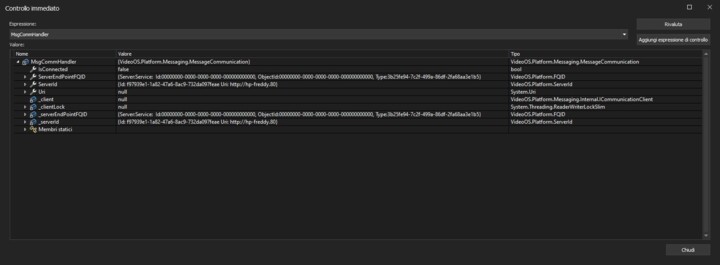
Unfortunately the fix doesn’t solve it. This is the state of the Communication Channel, in the Close of the plugin, before sending the logout message …
Frediano
Could you please retest by where you deploy the new dll to the Event Server as well as to the Smart Client? I might have made a mistake in my instructions.
In the previous test I had only replaced the dll in the SC folder, now I have also replaced the one in the ES folder but the result does not change.
Frediano
Hi,
Same here. I have replaced dll files at both locations, but still Xprotect Smart client is not sending “Endpoint closed smartclient” message.
Would this be an issue in 2023 R2 also? We’re having some issues not quite the same but around disconnections occurring and taking a restart of the SC to recover.
Hi,
We haven’t tried with 2023 R2.
We will have to have a better reproduction here at Milestone.
I have an idea that you would be able to do a small (minimal) modification to the Chat sample and share it here, with this modified code I could make sure I am able to reproduce.
When I reproduced I had a subscription to the “Endpoint closed smartclient” message, but no test code in the close method.
I hope somebody will be able to tell me how to reproduce and test..
Hi,
Here I am sharing some code
_obj3 = _messageCommunication.RegisterCommunicationFilter(EndPointCloseIndicationHandler, new VideoOS.Platform.Messaging.CommunicationIdFilter(MessageCommunication.EndPointCloseIndication));
private object EndPointCloseIndicationHandler(VideoOS.Platform.Messaging.Message message, FQID dest, FQID source)
{
  EndPointIdentityData user = message.Data as EndPointIdentityData;

  DoLog("EndPoint closed " + user.EndPointFQID.ServerId.ServerType + " : " + user.EndPointFQID.ServerId.ServerHostname);

  for (int i = 0; i < AllEndPoints.Count; i++)

  {

    if (AllEndPoints\[i\].EndPointFQID.ServerId.Equals(user.EndPointFQID.ServerId))

    {

      if (user.EndPointFQID.ServerId.ServerType == "SmartClient" && user.EndPointFQID.ServerId.ServerHostname == SmartClientName)

        SelectedEndPoint = null;

      AllEndPoints.RemoveAt(i);

      break;

    }

  }

  return null;
}
Let me know if you need entire solution.
Regards,
Priyanka