AI Bridge to Milestone VMS: ONVIF Metadata Not Appearing on VMS Side, not even recieving it.

Hi everyone,

I’m currently working on integrating AI Bridge with a Milestone VMS (XProtect Corporate 2024 R2). A couple of months ago, everything was running smoothly—I could use GraphQL mutations to register the analytics application, and the AI Bridge showed as healthy and connected.
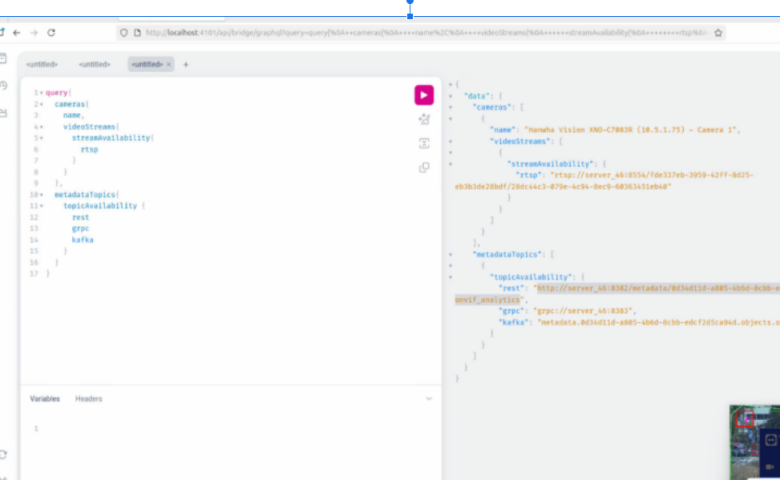
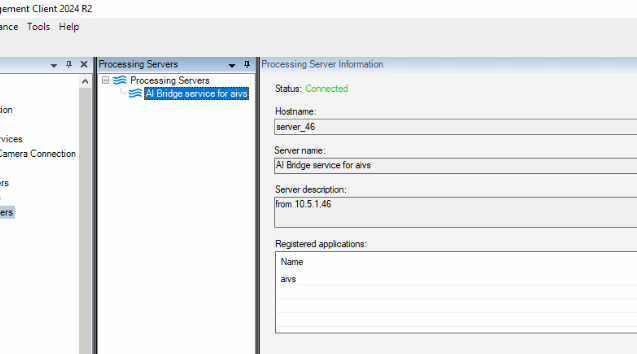
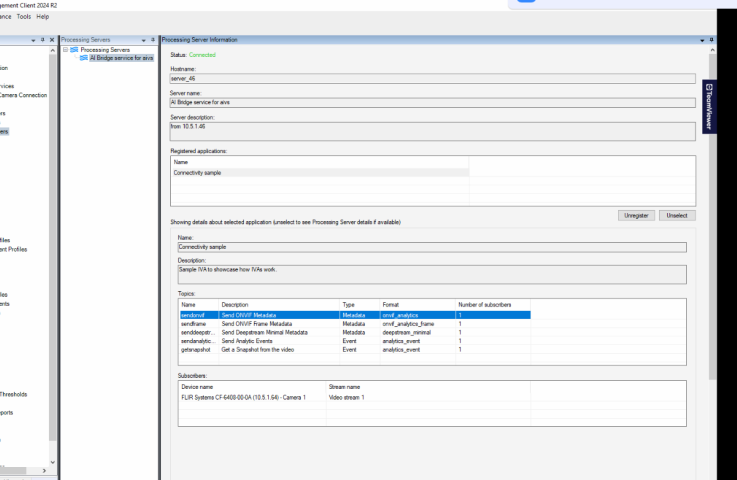
I am subsribing to the topic, as and it shows in processing server subscriber list as expected.

Now, I can still successfully send ONVIF metadata in XML format through a REST API endpoint. I’m receiving HTTP 200 responses, and the timestamps of the systems are synchronized using an NTP server. The XML is in the correct format according to the documentation.

However, on the VMS side, I’m not seeing any bounding box metadata or any indication that the metadata device is receiving data. There are no related log entries on the VMS side (devicehandling log in the recording server part) either, so it seems like the metadata isn’t being forwarded or isn’t in transit.

I’m looking for help on how to debug this situation or if anyone has encountered a similar issue. Any pointers on what logs to check or what configuration details to verify would be greatly appreciated!

I am attaching aib logs as well in a zip file.

Thanks in advance!

Hi @ofer apitz​ ,

Reading your comment: " A couple of months ago, everything was running smoothly"

I believe the reason behind the problem you’re experiencing is due to this documented breaking change:

What’s new in Milestone AI Bridge

Mind from the former link:

"

To continue receiving analytics events fromMilestone AI Bridge, you can either rename your IVA analytical events to the new naming format `app-name / event-name` in your Management Client, or you can unsubscribe all your former analytic event topics and then subscribe to the topics again.

If you have created rules or alarm definitions that reference these analytics topics and didn’t rename your IVA analytic events, you must update the rules or alarm definitions to the new analytic event name format.

"

----------

In regards of the metadata there’s now the ‘EXTERNAL_ROOT_PATH’

What’s new in Milestone AI Bridge

Mind from the former link:

If you have hardware that was created based on a Milestone AI Bridge subscription (metadata or video topics), you must either:

Set the environment variable EXTERNAL_ROOT_PATH to “” (ie empty) in your .env file

… or …

Update all your currentMilestone AI Bridge’s VPS-related hardware URLs.

See the following examples:

For video-related hardware

In the properties of hardware, add ‘/processing-server’ to the path, changing the URLs from:


VPSNODES,http://[AiBridgeHost]/video/[guid]/[topic]/[format]/[guid]/[guid]

to


VPSNODES,http://[AiBridgeHost]/processing-server/video/[guid]/[topic]/[format]/[guid]/[guid]

For metatada-related hardware

In the properties of hardware, add ‘/processing-server’ to the path, changing the URLs from:


VPSNODES,http://[AiBridgeHost]/metadata/[guid]/[topic]/[format]/[guid]/[guid]

to


VPSNODES,http://[AiBridgeHost]/processing-server/metadata/[guid]/[topic]/[format]/[guid]/[guid]

Let us know if these actions could mitigate the issues you are facing.

thanks for the answer, but we didnt update the ai bridge, anyway I will get back on this.

rest_url": "http://server_46:8382/metadata/0d34d11d-a805-4b6d-8cbb-edcf2d5ca94d/objects/onvif_analytics

Hi @Lisber Pontes

This is the rest end point that is being read from graphql api.

You are asking me to change it to

http://server_46:8382/**processing-server/**metadata/0d34d11d-a805-4b6d-8cbb-edcf2d5ca94d/objects/onvif_analytics.

But the older one is also giving 200 as status in anycase, I will do new change and comeback later.

Also, in the begining itself, we were using ai bridge 2.0.1, no difference in versions!!

Hi @Lisber Pontes​ ,

I changed url to add processing-server, but only to get 404 from rest endpoint.

is there anything else, i can do?

Hi @ofer apitz​ ,

if you’ve been using AIB 2.0.1 then the environment variable EXTERNAL_ROOT_PATH has already been present. So, tis can’t be the issue.

Reading the logs from ‘webservice.log’ and ‘connector.log’ I’ve seen that the connection against the VMS is failing way more than before (March and April).

In the webservice.log I’m seeing:

GraphQL request:1:12
1 | mutation { register(input: {
  |            ^
2 |   url: "https://milestone4:443"
2025-11-07T12:05:17.962Z error: Error adding endpoint: Post "https://milestone4:443/ManagementServer/ServerCommandService.svc": tls: failed to verify certificate: x509: certificate signed by unknown authority (possibly because of "crypto/rsa: verification error" while trying to verify candidate authority certificate "VMS Certificate Authority")

Could it be a problem with the certificates ?

We have documented the process when certificates are required: MilestoneAIBridge_IntegratorManual_en-US (Page 33).

From the connector logs.

2025-09-03T13:26:17Z Error while Getting Status: [POST https://milestone4:7563/recorderstatusservice/recorderstatusservice2.asmx giving up after 6 attempt(s): Post "https://milestone4:7563/recorderstatusservice/recorderstatusservice2.asmx": dial tcp 10.5.1.91:7563: connect: connection refused] 
2025/11/07 12:48:09 Error adding endpoint: Post "https://milestone4:80/ManagementServer/ServerCommandService.svc": http: server gave HTTP response to HTTPS client

In this last entry it tries to connect to an ‘https’ but then using the port 80.

Please check you’re not adding the port (as the following code is showing)

# XProtect endpoint and credentials (use https to connect with TLS)
VMS_URL="https://<my-management-server-hostname>"
 
Example:
VMS_URL="https://milestone4"
 

Last but not least, some weeks ago we’ve detected a regression affecting the naming convention on topics. Could you also enforce that topics are set using lower-case.

All in all, I believe the problem is related to the connection to the VMS, the connector is showing multiple errors when trying to connect to the RS and also the error mentioned above mixing http with https.

Hi @Lisber Pontes

Thanks for the quick response.

The issue with http and https, is resolved and connection is made without any issue.

Also it was you that helped to solve it and we use it without https now.

https://developer.milestonesys.com/s/question/0D5bH00001cxz9tSAA/how-to-avoid-tls-certificate-requirement-for-ai-bridge-in-development-setup

Everything is good, but silently the metadata is discared and not shown. I will share the logs once again.

This is the logs attached from the latest working ai bridge 2.0.1 but without metadata being shown, please check for last 3 days of logs.

@Lisber Pontes​ Please let me know if anything else is needed to solve the issue.

Hi @ofer apitz​ ,

I’ll check those logs.

In the meantime, please install this ‘sample application’:

MIP-AIBridge-samples/apps/golang/connectivitysample at main · milestonesys/MIP-AIBridge-samples

there will be topics to inject metadata (bounding boxes) and events. Please just adjust the .env file to match your installation and give it a try (please let me know if the bounding boxes and events are being received by the VMS).

OK, I will do it, and will let you know the update.

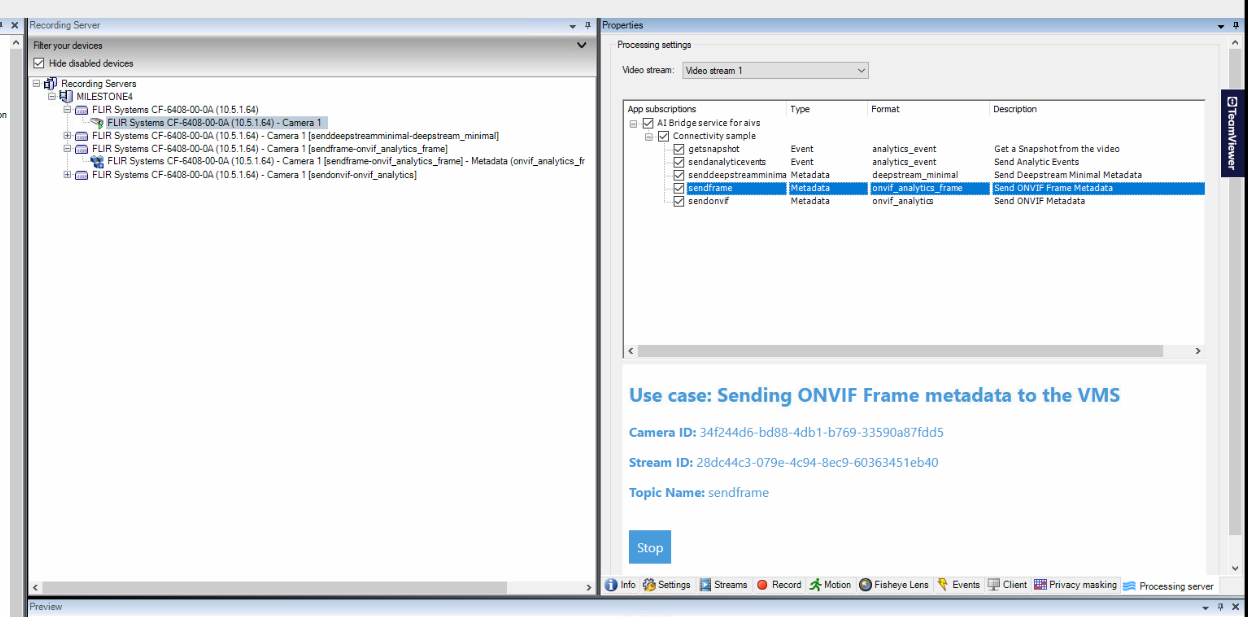
Added service, topics subscribed

But still doesnt see any metadata, or am I expected to see anything??

I have no longer access to the posted logs (due to the forum question migration).

And just to also recap the current status.

1 - You see the green connected icon in MC - Plugin.

→ That means that MC can connect to the AI Bridge health endpoint (but there’s not really a complete health verification being done here more than being able to access the container and some minor internal checks.

2 - Connector container logs show sync of 100%

→ That means that the connector container can connect to the Management Server and through the configuration API is retrieving all the RS and camera info.

What I believe is not working as expected.

1 - Connection to the Recording Server from AI Bridge.

1.1 - Obtain a camera’s screenshot.

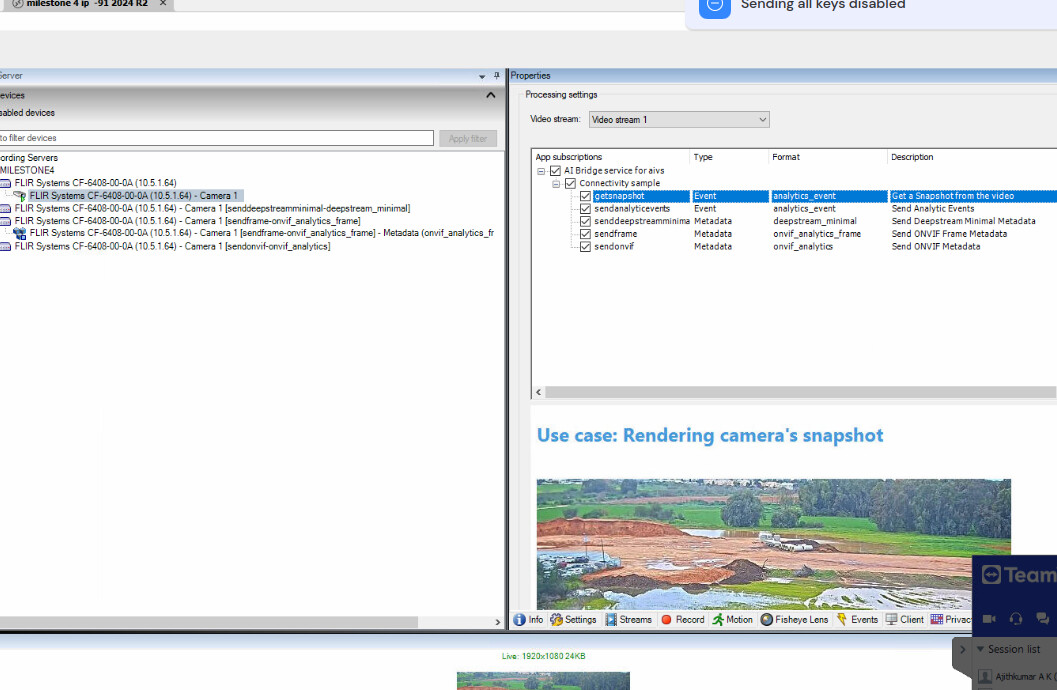
Using the connectivity sample app (mentioned before) there’s a topic that renders a live snapshot of the camera, it is called ‘getsnapshot’.

When you click on it on any camera, can you confirm you see the snapshot being rendered ?

In case it doesn’t work:

1 - Attach all AI Bridge logs (Connector log should have an error if it can’t connect to RS to get the snapshot)

2 - Is the RS and the MS in the same host/machine ?

3 - Could it be possible to run XPCO without certificates ? using server-configurator the encryption can be set ON/OFF. After disabling the encryption in XProtect (through server-configurator) you will need to adjust your AI Bridge .env file so it points to ‘http’ instead of ‘https’ for the Management Server.

PS: I’m trying to focus first on the connection between AIB → RS before entering into VPS (metadata).

Hi @lisber thanks for pointing to right direction. I will check and let you know the details

Hi @lisber

1 - Connection to the Recording Server from AI Bridge.

1.1 - Obtain a camera’s screenshot.

Using the connectivity sample app (mentioned before) there’s a topic that renders a live snapshot of the camera, it is called ‘getsnapshot’.

When you click on it on any camera, can you confirm you see the snapshot being rendered ?

I clicked on start button in processing server page, nothing is seen or capture is not done.

In case it doesn’t work:

1 - Attach all AI Bridge logs (Connector log should have an error if it can’t connect to RS to get the snapshot)

Please find the logs

it says new users cant upload

2 - Is the RS and the MS in the same host/machine ?

yes

3 - Could it be possible to run XPCO without certificates ? using server-configurator the encryption can be set ON/OFF. After disabling the encryption in XProtect (through server-configurator) you will need to adjust your AI Bridge .env file so it points to ‘http’ instead of ‘https’ for the Management Server.

The XP is already running without http
.env also expects a non encrypted system, as we need it like that for now.

Please find the logs

Hi @Oferap ,

I was referring to the topic called “getsnapshot” (is the first one of this app).

Please click on it, and check if there’s a snapshot render in MC. If not, please attach the AI Bridge logs.

This topic will end up contacting the RS to get the snapshot/thumbnail of the camera.

Sorry, Will repeat and come in sometime

Hi @lisber

it worked!!

Hi @lisber
Please find the link as well to the log

34f244d6-bd88-4db1-b769-33590a87fdd5  FLIR Systems CF-6408-00-0A (10.5.1.64) - Camera 1  OnRecordingStateChanged, isRecordingRecords=False (table: 34f244d6-bd88-4db1-b769-33590a87fdd5)
2026-01-19 10:32:01.423+02:00 [    69] INFO       - 34f244d6-bd88-4db1-b769-33590a87fdd5  FLIR Systems CF-6408-00-0A (10.5.1.64) - Camera 1  OnRecordingStateChanged, isRecordingRecords=True (table: 34f244d6-bd88-4db1-b769-33590a87fdd5)
2026-01-19 10:32:13.120+02:00 [   221] INFO       - 34f244d6-bd88-4db1-b769-33590a87fdd5  FLIR Systems CF-6408-00-0A (10.5.1.64) - Camera 1  OnRecordingStateChanged, isRecordingRecords=False (table: 34f244d6-bd88-4db1-b769-33590a87fdd5)
2026-01-19 10:33:25.415+02:00 [    69] INFO       - 34f244d6-bd88-4db1-b769-33590a87fdd5  FLIR Systems CF-6408-00-0A (10.5.1.64) - Camera 1  OnRecordingStateChanged, isRecordingRecords=True (table: 34f244d6-bd88-4db1-b769-33590a87fdd5)
2026-01-19 10:33:33.123+02:00 [   104] INFO       - 34f244d6-bd88-4db1-b769-33590a87fdd5  FLIR Systems CF-6408-00-0A (10.5.1.64) - Camera 1  OnRecordingStateChanged, isRecordingRecords=False (table: 34f244d6-bd88-4db1-b769-33590a87fdd5)
2026-01-19 10:34:51.607+02:00 [    69] INFO       - 34f244d6-bd88-4db1-b769-33590a87fdd5  FLIR Systems CF-6408-00-0A (10.5.1.64) - Camera 1  OnRecordingStateChanged, isRecordingRecords=True (table: 34f244d6-bd88-4db1-b769-33590a87fdd5)
2026-01-19 10:35:00.390+02:00 [    35] INFO       - 34f244d6-bd88-4db1-b769-33590a87fdd5  FLIR Systems CF-6408-00-0A (10.5.1.64) - Camera 1  OnRecordingStateChanged, isRecordingRecords=False (table: 34f244d6-bd88-4db1-b769-33590a87fdd5)
2026-01-19 10:35:03.706+02:00 [    69] INFO       - 34f244d6-bd88-4db1-b769-33590a87fdd5  FLIR Systems CF-6408-00-0A (10.5.1.64) - Camera 1  OnRecordingStateChanged, isRecordingRecords=True (table: 34f244d6-bd88-4db1-b769-33590a87fdd5)
2026-01-19 10:35:15.398+02:00 [   147] INFO       - 34f244d6-bd88-4db1-b769-33590a87fdd5  FLIR Systems CF-6408-00-0A (10.5.1.64) - Camera 1  OnRecordingStateChanged, isRecordingRecords=False (table: 34f244d6-bd88-4db1-b769-33590a87fdd5)
2026-01-19 11:07:13.200+02:00 [    69] INFO       - 34f244d6-bd88-4db1-b769-33590a87fdd5  FLIR Systems CF-6408-00-0A (10.5.1.64) - Camera 1  OnRecordingStateChanged, isRecordingRecords=True (table: 34f244d6-bd88-4db1-b769-33590a87fdd5)
2026-01-19 11:07:28.426+02:00 [   172] INFO       - 34f244d6-bd88-4db1-b769-33590a87fdd5  FLIR Systems CF-6408-00-0A (10.5.1.64) - Camera 1  OnRecordingStateChanged, isRecordingRecords=False (table: 34f244d6-bd88-4db1-b769-33590a87fdd5)
2026-01-19 11:29:18.694+02:00 [    69] INFO       - 34f244d6-bd88-4db1-b769-33590a87fdd5  FLIR Systems CF-6408-00-0A (10.5.1.64) - Camera 1  OnRecordingStateChanged, isRecordingRecords=True (table: 34f244d6-bd88-4db1-b769-33590a87fdd5)
2026-01-19 11:29:32.343+02:00 [   139] INFO       - 34f244d6-bd88-4db1-b769-33590a87fdd5  FLIR Systems CF-6408-00-0A (10.5.1.64) - Camera 1  OnRecordingStateChanged, isRecordingRecords=False (table: 34f244d6-bd88-4db1-b769-33590a87fdd5)
2026-01-19 11:40:00.994+02:00 [    69] INFO       - 34f244d6-bd88-4db1-b769-33590a87fdd5  FLIR Systems CF-6408-00-0A (10.5.1.64) - Camera 1  OnRecordingStateChanged, isRecordingRecords=True (table: 34f244d6-bd88-4db1-b769-33590a87fdd5)
2026-01-19 11:40:13.360+02:00 [    58] INFO       - 34f244d6-bd88-4db1-b769-33590a87fdd5  FLIR Systems CF-6408-00-0A (10.5.1.64) - Camera 1  OnRecordingStateChanged, isRecordingRecords=False (table: 34f244d6-bd88-4db1-b769-33590a87fdd5)


Still Metadata sending doesnt work, Please follow up.

Alright,

This is good news.

Now we know that AI Bridge can contact Milestone Recording Server (RS).

Now, the flow when the MC subscribe to a metadata topic is:

RS will start a web-socket connection to the proxy container. That means that the RS should be able to contact the proxy AI Bridge container.

This is why in the VPS hardware settings there’s an url like:

VPSNODES,http://[AiBridgeHost]/processing-server/metadata/[guid]/[topic]/[format]/[guid]/[guid]

or

VPSNODES,https://[AiBridgeHost]/processing-server/metadata/[guid]/[topic]/[format]/[guid]/[guid]

Since we your VMS is running http the endpoint should look like the first one.

If the RS can’t reach the proxy container the WebSocket (based protocol for VPS) will not happen.

My believe is that that the machine running the RS/MS may not be able to reach to the AI Bridge host.

Questions:

1 - Can you ping the AI Bridge host (by name) from the machine running RS ?

use the hostname of the VPS endpoint: [AiBridgeHost]

if you can’t please add it an entry to the host files in the RS host.