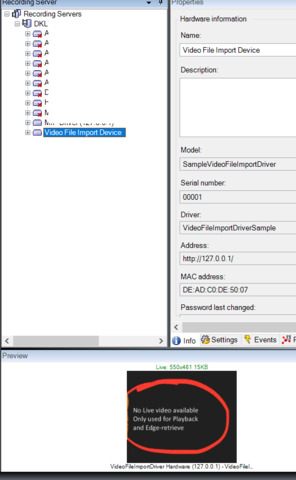
The sample described here seems to cover what you are looking for; it describes how to read a video file into XProtect. The sample should be extendable to also read the audio parts of the (same) file.
can this solution also be used with multiple videos? I have a list of video mp4.
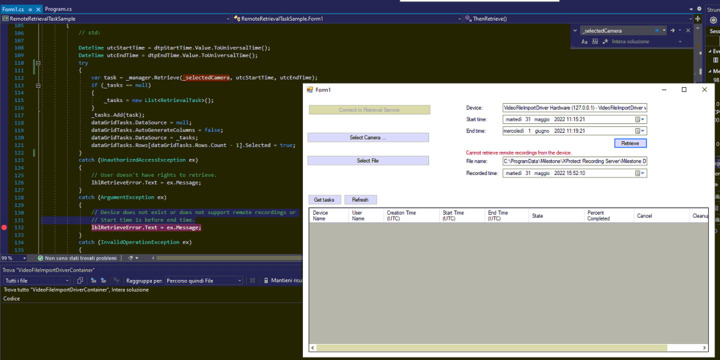
I execute “Remote Retrieval Task Sample” Form and execute the action “Connect to Retrieval Service”, but when I try to add a new hardware from XProtect Management Client (like MIP Device Driver or DemoDriver) i can’t add it (see image)
What you explain confuses me a bit. What I must say is that there are three step. 1) Deploy a driver. 2) Add a camera device. 3) Use the camera device (retrieval or other usage).
I would however expect you to retrieve the second video from the same camera device and neither have to deploy a driver nor add a device after having been able to do the first retrieval. But my understanding of the use case scenario might be lacking.
If my answer does not fit please elaborate on the process of what you do.
When adding the “Hardware” to the Recording Server, choose “Manual” and you’ll find the driver under “Other”, “VideoFileImportDriverSample”. It doesn’t require username/password, and it’s not using the Address:
I wonder if that could be a license issue? The VideoFileImportDriverSample relies on Edge Storage, which is available in XProtect Professional+ and upwards (according to Compare Milestone products | Milestone Systems).
A check could be added to the code, something like this..:
    var licenseInformation = EnvironmentManager.Instance.LicenseManager;
    var features = licenseInformation.Features;
    if (!features.Contains("EdgeStorage"))
    {
        //  "the needed feature 'EdgeStorage' is not available on this installation-license!";
    }
You will need to first consider how XProtect works in general. You have camera devices that stream video which is recorded. The streaming of video and recording is governed by rules. You can utilize edge memory functionality to gather more video from these cameras when the cameras support it. What is recorded is deleted automatically again governed by the retention setup on the storage used for the camera.
Now you develop a solution that (a) setup a camera device and (b) retrieve video to be recorded to the storage.
If you want to have multiple of these retrieved videos you can do this in two ways. You can have one camera device added and the retrieve video and store it in different time periods. You can add multiple devices and then retrieve video which then can be stored. The latter solution has the benefit that it allows recorded footage in same or overlapping time periods. The latter solution will be more costly as each device will require a camera license.
You might be using XProtect differently than what was the initial use case and design, but I think it will work if you find ways to incorporate the nature of XProtect while finding ways to have special devices..
I might not have considered all that is special compared to the base design and functionality. Do not hesitate to ask again if you have questions on this.
the error message seems unrelated to the “VideoFileImportDriverSample”. Are you able to add other hardware / drivers at this stage? (like the classic MIP Driver?)
The “VideoFileImportDriverSample” doesn’t require username/password, and should not use the Address for anything.
Re. “can this solution also be used with multiple videos? I have a list of video mp4.”
If you want to retrieve several files in one Edge Retrieve command, the VideoFileImportDriverSample needs to know about these files when the edge retrieve happens; when data is read. The VMS will continue to edge retrieve (within the specified start/end-time, until you (the driver!) returns a null PlaybackReadResponse from ReadData, like at the "— No frame data returned " trace in the code.
It is up to you, how to instruct the driver to open several files, and open them when needed.
Are you able to add other hardware / drivers at this stage? (like the classic MIP Driver?)
YES, i tried with DemoDriver and it’s ok!
The “VideoFileImportDriverSample” doesn’t require username/password, and should not use the Address for anything.
the only setting without user and password is the option that I set in the video, I can’t find any other settings to avoid username/password during add hardware.
NOTE. Hans’ reply means I was wrong when I wrote: - That you have a device at localhost port 80 seems wrong. I think port 80 is your Management Server. It will explain the error message in the sense that if the Management Server cannot communicate it could present itself as other communication breaking (other being the SQL Server in this case).
While I never have seen the issue as you have recorded it my guess is that you are using the wrong port for your device.
"Configure the VideoFiileImport device driver on a recording Server
You can configure the VideoFiileImport device driver as with any other driver: Add Hardware on the Recording Server, manually, and selecting the device on f.eks. 127.0.0.1 port 80, and there’s no username/password validation…"
Can I tried another port?
How can tried it?
this code is in the RemoteRetrievalTaskSample, I tries to change parameter of RetrievalTaskManager:
private void btnConnect_Click(object sender, EventArgs e)
		{

              try
            {
               //_manager = new RetrievalTaskManager(EnvironmentManager.Instance.MasterSite);
               _manager = new RetrievalTaskManager("http://localhost/", 22222, "test", "test");
                _manager.Connect();

				btnConnect.Enabled = false;
                btnSelectCamera.Enabled = true;
			}
			catch (NotAuthorizedMIPException ex)
			{
				// The was a problem with login credentials. Check user name and password
				lblLoginError.Text = ex.Message;
			}
            catch (MIPException ex)
            {
                // There was a problem contacting management server. Check the address.
                lblLoginError.Text = ex.Message;
            }
        }

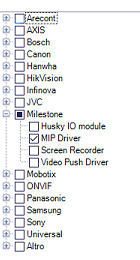
 Can you help me?