Subscribing to Metadata topic/creating metadata device causes Recording server to be in a crash loop

Hi - I just posted about the same issue just a few weeks back. here - AI Bridge Docker 2.0.5 doesn't allow a certain amount of metadata devices to be created

Although there may have been possibly a connecting issue that was fixed (removing a processing server configuration line in the database) the original issue still remains.

After re-building the bridge, I successfully was able to subscribe all our cameras to their metadata device. It ran smoothly all last week and over the weekend. Yesterday I brought down the bridge for an update then brought back up.

Today I was subscribing more cameras to their metadata stream when the same thing happened. The recording server crashed, and then it was stuck in a reboot loop. We were off line for over 2 hours.

Since the AI Bridge is too unstable for production, we are going to be putting this on hold till at least we can pinpoint the problem and fix it, or wait for an update to the AI bridge. (The processing server side). The back end Linux, docker compose has no issue. The issue is on the Front end GUI when ticking the metadata boxes to subscribe cameras to.
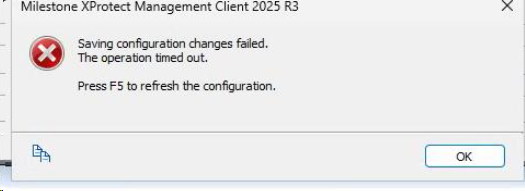
The error is the same as last time:

System.NullReferenceException**: Object reference not set to an instance of an object.**

***at VideoOS.Recorder.ObjectModel.Pipeline.ThreadFunctionPart1()


I’ve attached a snippet of when things went wrong with the error from DeviceHandling.log

DeviceHandling2.log (11.6 KB)

I’m not sure if this is something in particular with our system, or if anyone has seen this from others.

I have a testing lab for the AI bridge, but I don’t have the amount of cameras to add to it to try and replicate the production system.

Milestone support wasn’t much support other then shutting down the recording server, and telling us to remove the metadata devices. But once we shutdown the recording server, we could not remove any metadata devices, the Management client would just hang.

The only fix I could think of is removing the configuration database line that I discovered earlier, that fixed another issue in the previous post. I’m not sure if that helped, but when the recording server was brought back online, it stopped rebooting and recovered. Now we have metadata devices that are in the system, that when we try and remove, we can’t. The management client will just freeze up. We currently have a lot of logs generating that say VPS cannot connect to the recording server. here is a snippet:

2026-06-02 10:55:23.149-07:00 [ 474] ERROR - 71595fd3-23af-41b3-8aa7-81619d18978a VpsThread - VpsThread - Error: Unable to connect to the remote server
2026-06-02 10:55:23.155-07:00 [ 474] ERROR - ed1cf429-d2eb-464a-99bb-6be3bbf19c8b VpsThread - VpsThread - Error: Unable to connect to the remote server
2026-06-02 10:55:23.173-07:00 [ 474] ERROR - 73c69cdb-2ecb-498d-9c55-ddb2561792d9 VpsThread - VpsThread - Error: Unable to connect to the remote server
2026-06-02 10:55:23.218-07:00 [ 474] ERROR - 31c126cd-dcfd-4f19-85ab-cb1c1c7239e1 VpsThread - VpsThread - Error: Unable to connect to the remote server
2026-06-02 10:55:23.329-07:00 [ 474] ERROR - cc574514-10ec-4b17-ab08-bd6668f04122 VpsThread - VpsThread - Error: Unable to connect to the remote server

Since this seems to happen on random metadata devices, its hard to pinpoint what the issue is. This problem is a dead stop for us a company that manages and monitors over 500 cameras in the security field.

From a high level view - it seems to be injecting bad data/no data that the database cannot accept or passing along a null object that wasn’t caught. At the very least I imagine that it should have at least some exception handling to refute any malformed data being injected. Creating and subscribing to metadata devices should not cause a catastrophic failure of the system.

If there are anymore logs you need, let me know. The docker logs on the AI bridge linux end, seem to contain the same as last time. Just generic logs showing when the recording server stopped communicating.

Again, I would love for this to be fixed. And if there is anything you need for me, let me know

Vince
Hi @Vince ,

The UI crash we are seeing in MC seems to be due to “unescaped special characters” inside the XML (the xml stored in [CustomSettings])

Context:
When a user subscribe to a topic using Processing Server MIP Plugin, these options are stored in the [CustomSettings] table on a field called ‘SettingDataXml’. This content is encrypted.
However, Milestone through the API Gateway provides a mechanism to pull and push data (The MIP Plugin is interacting with the API Gateway behind the curtains).

Somehow looks like the data sent through the API Gateway had a “unescaped special characters” that were then stored in [CustomSettings] SQL table.

Troubleshooting:

In order to to know where’s the faulty data, let’s retrieve the content from [CustomSettings] SQL table, using the API Gateway.:

Steps:

1 - Get a Bearer token:
Adjust the following variables accordingly to your setup:
<your-vms-host_ip>

curl -X POST “http://<your-vms-host_ip>/idp/connect/token” -H “Content-Type: application/x-www-form-urlencoded” -H “Accept: /” -d “grant_type=password&username=&password=&client_id=GrantValidatorClient”

2 - Get the current faulty configuration (the encrypted xml from ‘[CustomSettings]’ table):
<your-vms-host_ip>
<bearer_token_value_from_step_1>

curl -X POST “http://<your-vms-host_ip>/API/rest/v1/mipKinds?task=GetMIPOptionProperty” ^
-H “Content-Type: application/json” ^
-H “Accept: /” ^
-H “Authorization: Bearer <bearer_token_value_from_step_1>” ^
-d “{"optionId":"8c2ce0e4-d755-4171-95e1-1154a67f83d1","userPrivate":"false"}”

Please attach the content of this response here (we may find what’s the “unescaped special characters” that’s causing this issue).

PS: This can explain the crash in the Management Client. However, it may not explain why Recording Server is entering into an unstable state.
Let’s see how it behaves once we identify and patch this faulty data.

Thanks for the response @lisber - Unfortunately during the failure, I removed that custom setting line in the database (and did not back it up), so it returned:

Invoke-RestMethod : { “error” : { “httpCode” : 404, “details” : [ { “errorText” : “No data for optionId: 8c2ce0e4-d755-4171-95e1-1154a67f83d1” } ] }, “params” : {
“optionId” : “8c2ce0e4-d755-4171-95e1-1154a67f83d1”, “userPrivate” : false } }

But I did backup that same custom setting line when the last time I rebuilt the bridge, as I got the same UI error as I had in the past(this was after I brought it down, then brought it back up, that’s when the error showed) But it did not effect any recording server functions at that time. As I had not even brought up any IVA applications.

That backup is a .csv file. But like you said its encrypted.

We can use that.. even though its not related to this specific failure, it might have the same corrupted issue.

I’m not sure what is easier, if you have a way of de-encrypting a .csv file directly?

Or should I put that line into my test lab database then call the same API function. Would this work? or does each milestone server have a unique encryption key?

FYI - We have a huge database (178 TB), and it seemed like everything recovered overnight. This morning I’ve been able to remove metadata devices and were able to add cameras as well and recording server has been stable

Hi @Vince ,

Sadly the encrypted value can only be decrypted from the same machine (there’s a DPAPI configuration involved), and also an encrypted key stored in the same DB.

If you ever run into this issue again, please follow the steps above and let us know the unencrypted value of the XML content.

That way we can trace what was causing this issue and try to patch it (if it’s something we are doing wrong in our code).

Cheers.

@lisber - Ok, yea I did some digging around the management client source code and found that out.
There may as well be two separate things going on here.

I was able to pull that database line out in my working lab environment just to see what the format was. There is a key called “camName” that pulls in the camera name. Now the only camera name we have in our production system that I think can cause an issue is one called:

West Coast Sand & Gravel

That ampersand might be the issue. This could be related to the UI error. But not sure if this in any relation to causing the recording server crash, that’s what I’m most concerned with.

But that name was in our system with the AI bridge up a whole week (and metadata subscribed) working fine while there was no issue. There wasn’t an issue until I started added more metadata devices/subscribing

Unfortunately I can’t move forward with this until the issue is found before I start with production again. So I’ll be doing some more testing on my end, like changing the camera name in the lab to include a “&” in the name and see results. Do you also see this affecting the recording server in any way?

I’ll keep you updated

@lisber - In my lab environment, I changed the name of the camera and added a “&”.

It looks to have escaped it properly for json at this stage. but not for XML

"XML": "\u003cdata\u003e{\"12355b21-5a25-4a1d-b6d2-f6e02c9b95b4/3a89da8b-6d20-4ad0-a0c3-8a047610ad4d/wifieye-metadata/Metadata/onvif_analytics\":[{\"camId\":\"d534345c-2579-4b06-a94a-0e45fa4a01ef\",\"camName\":\"wifieye - LPR \u0026amp; Test C2 US\",\"streamName\":\"Video stream 1\",\"enabled\":true,\"hardwareId\":\"0c806f5d-4834-4d7f-85ff-b71b3197dbe3\"}]}\u003c/data\u003e"

would this cause the issue?

I can’t think of no other data/camera that is being passed into this file that can be corrupted. Also I had the same metadata devices all working the week before, with no recording crashes.

Its when I add new metadata devices, or even if I deleted some, then re-subscribed, that it can possible happen. It’s very intermittent.

Theoretically, could this be a issue on the IVA end?

Considering the apps register successfully, and I see no errors related to how they run. I’m just looking at all possibilities.

I also believe this problem only happens after when there are hundreds of metadata devices that have been already created. Each time the recording server has crashed, that has been the case.

@lisber I was able to replicate the same error in my lab. After changing the name to include a &, I subscribed to a metadata topic, no error yet. After that I wanted to create more metadata devices, so since I only have one camera set up, I created many IVA apps that each created a unique metadata channel. Then with that one camera I subscribed to all those metadata channels creating many metadata devices. that is when the error showed up:

===================================

An error occurred while parsing EntityName. Line 1, position 225. (System.Xml)

Program location:

at System.Xml.XmlTextReaderImpl.Throw(Exception e)

at System.Xml.XmlTextReaderImpl.ParseEntityName()

at System.Xml.XmlTextReaderImpl.ParseEntityReference()

at System.Xml.XmlTextReaderImpl.Read()

at System.Xml.XmlLoader.LoadNode(Boolean skipOverWhitespace)

at System.Xml.XmlLoader.LoadDocSequence(XmlDocument parentDoc)

at System.Xml.XmlDocument.Load(XmlReader reader)

at System.Xml.XmlDocument.LoadXml(String xml)

at VideoOS.Administration.AddIn.PlatformConfigurationManager.GetOptionsConfiguration(Guid toolsOptionsPluginId)

at VideoOS.Administration.AddIn.XPCOConfiguration.GetOptionsConfiguration(Guid optionsDialogId, Boolean userPrivate)

at VideoOS.ProcessingServer.Plugin.Admin.UI.TopicSubscriptions.Load()

at VideoOS.ProcessingServer.Plugin.Admin.UI.ProcessingServerUserControl.FillContent(Item item)

at VideoOS.ProcessingServer.Plugin.Admin.UI.ProcessingServerItemManager.FillUserControl(Item item)

at VideoOS.Administration.AddIn.UserControlPlatformInfo.InitCheckAndFillUserControl(Item item)

Either way, This problem is easy to get around by renaming the topics, so not really concerned with this, its the recording server crash. And I see no correlation between the above UI parse error to this error yet:

This is the only error that happens when the recording server crashes

@lisber - I think I found the actual cause of the Recording Server crash.

A crash dump was generated by the Recording Server or milestone support created it during the recording crash. From analyzing the dump file, I can tell the exception is occurring inside the metadata pipeline itself, after it was created.

Starting with the first error in log:
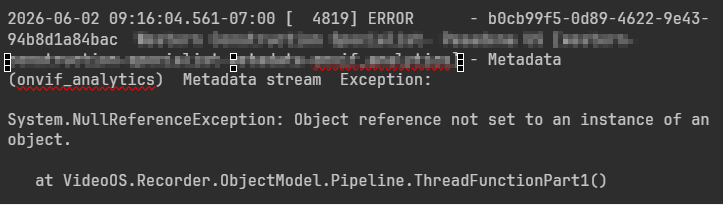
2026-06-02 09:16:04.561-07:00 [ 4819] ERROR - b0cb99f5-0d89-4622-9e43-94b8d1a84bac company_name-metadata-onvif_analytics] - Metadata (onvif_analytics) Metadata stream Exception:

System.NullReferenceException: Object reference not set to an instance of an object.

   at VideoOS.Recorder.ObjectModel.Pipeline.ThreadFunctionPart1()

The dump shows this error in relation to GUID b0cb99f5-0d89-4622-9e43-94b8d1a84bac. That queue object had an internal field that was found to be null:

_pcFramesInQueue = 0000000000000000

System.NullReferenceException
VideoOS.Recorder.ObjectModel.PipelineQueue<GenericFrame>.PutFrameInQueue()

VideoOS.Recorder.ObjectModel.Pipeline.ThreadFunctionPart1()

This looks like a Recording Server metadata pipeline init/state bug, race condition during metadata startup. The Recording Server allowed a metadata stream queue to run while one of its required internal objects was null.

So it seems timing dependent, maybe based on Recording Server load.

Would subscribing to small batches at a time help this?

Should I only start publishing metadata from the source to the AI bridge only after the subscriptions are built?

Is this something that can/should be patched from Milestone?

Would having the .dmp file help?

Any suggestions would be greatly appreciated. As a lot of time and development has been put forth in this project.

thank you